AWS AI Services Explained: 13 Ready-to-Use ML Capabilities


1 Introduction
AWS, short for Amazon Web Services, is Amazon’s cloud computing platform, offering everything from compute and storage to machine learning. The machine learning corner of AWS in particular has so many tools that it can feel overwhelming the first time you look.
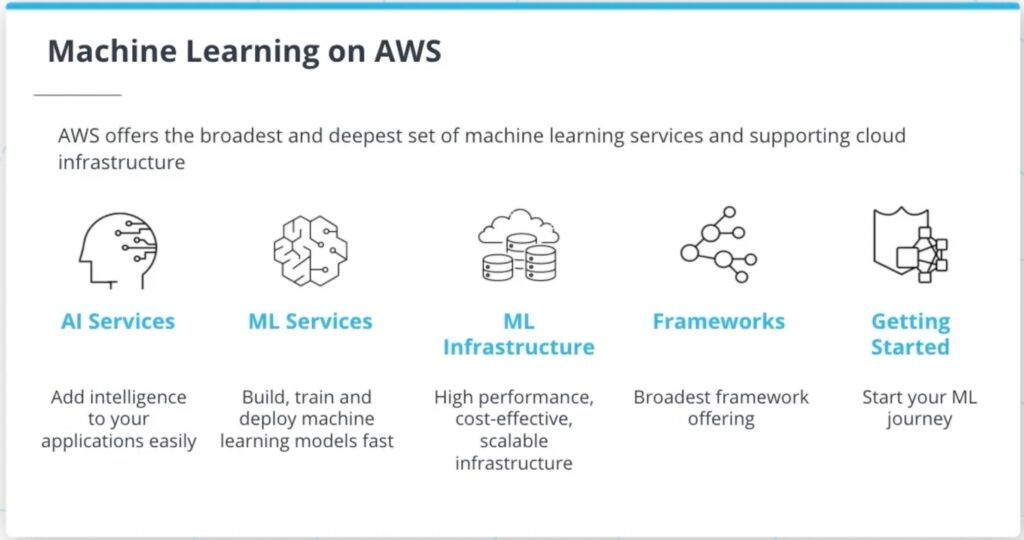
As the diagram above shows, AWS’s machine learning products roughly fall into five layers: AI Services, ML Services, ML Infrastructure, Frameworks, and Getting Started. Moving from top to bottom, each layer is less abstract and requires more hands-on work from you. The topmost layer, AI Services, is a set of ready-made services you can call through an API; the further down you go, the closer you get to training your own model and managing your own compute resources.
This article focuses on the top layer, AI Services – what application areas it covers, and what the flagship service in each area actually does.
2 AWS AI Services
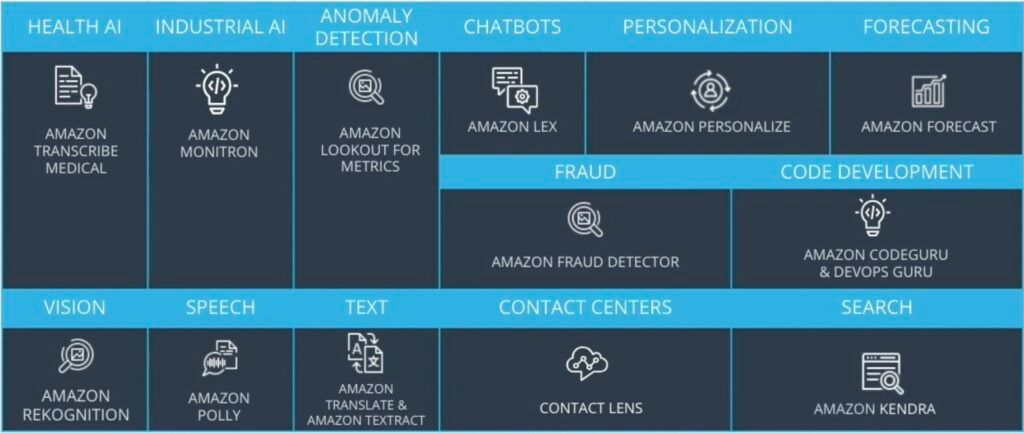
As shown above, AWS’s AI Services are organized into 13 use-case categories. Their biggest value proposition: developers don’t need to walk through the “five steps of machine learning” (defining the problem, building a dataset, training a model, evaluating the model, and running inference) themselves – they can plug AI capability directly into their own applications. AWS has already trained the model; all you have to do is prepare the input and consume the output.
Put plainly, this layer is for the case where “someone else has already solved my problem.” If what you need is speech-to-text, face detection, or product recommendations – generic tasks like these – training a model from scratch is usually not worth it. Conversely, if your problem is tightly coupled to your own business data, that’s when you need to move down to the ML Services layer instead.
Let’s go through all 13 categories in order.
2.1 HEALTH AI
If you’ve ever seen a doctor, this scene probably looks familiar: the doctor asks questions while typing away at the keyboard the whole time. Doctors have to type up their diagnosis as text to use as the basis for prescriptions, which splits their attention between the patient and the keyboard. Amazon Transcribe Medical exists to solve exactly this – it uses speech recognition to turn the conversation between doctor and patient into text, eliminating manual note-taking and letting the doctor focus back on the patient.
2.2 INDUSTRIAL AI
On the factory floor, Amazon Monitron combines sensors with a data analytics platform to predict when a machine is about to fail. Being able to predict a machine’s crash time ahead of schedule means maintenance can be scheduled proactively, avoiding the losses from an entire production line grinding to a halt.
2.3 ANOMALY DETECTION
This category is exactly what it sounds like: detecting anomalies. Amazon Lookout for Metrics can be used to catch anomalies in business data, such as a sudden drop in sales or a sudden dip in customer satisfaction.
2.4 CHATBOT
Amazon Lex lets you quickly add a chatbot into your application.
2.5 PERSONALIZATION
For personalized recommendations, Amazon Personalize lets developers build their own recommendation systems, commonly used in retail, entertainment, and media platforms.
2.6 FORECASTING
Amazon Forecast provides time-series forecasting to help businesses predict future changes in their data, such as next quarter’s sales or product demand.
2.7 FRAUD
Amazon Fraud Detector is used to detect online fraud. Online fraud takes many forms, and account registration and online payments are both common targets.
2.8 CODE DEVELOPMENT
Amazon CodeGuru helps developers improve code quality and identifies so-called “expensive” code – the sections that are dragging down performance.
2.9 VISION
On the vision side, Amazon Rekognition can quickly locate faces in photos and videos.
2.10 SPEECH
Amazon Polly turns text into realistic-sounding speech.
2.11 TEXT
Amazon Textract extracts text from photos and scanned documents. Compared to typical OCR, Textract’s edge is that it understands table structure, so it can pull out the relationships between the data in a table as well.
2.12 CONTACT CENTER
Contact Lens analyzes the conversation between a customer service agent and a customer, reads the sentiment and issue from the conversation, and files the conversation into categories afterward.
2.13 SEARCH
Amazon Kendra is an intelligent search service that helps users quickly find answers across an entire website.
Thirteen categories in one sitting is a lot to remember, so here’s a quick-reference table:
| Category | Flagship service | In one line |
|---|---|---|
| HEALTH AI | Amazon Transcribe Medical | Medical conversation to text |
| INDUSTRIAL AI | Amazon Monitron | Predictive machine failure |
| ANOMALY DETECTION | Amazon Lookout for Metrics | Business data anomaly detection |
| CHATBOT | Amazon Lex | Chatbots |
| PERSONALIZATION | Amazon Personalize | Personalized recommendation systems |
| FORECASTING | Amazon Forecast | Time-series forecasting |
| FRAUD | Amazon Fraud Detector | Online fraud detection |
| CODE DEVELOPMENT | Amazon CodeGuru | Code quality and performance review |
| VISION | Amazon Rekognition | Face detection in images and video |
| SPEECH | Amazon Polly | Text-to-speech |
| TEXT | Amazon Textract | Document text and table extraction |
| CONTACT CENTER | Contact Lens | Contact center conversation analysis |
| SEARCH | Amazon Kendra | Intelligent search |
(This list reflects AWS’s service lineup as of 2022; AWS updates its AI product line frequently, so it’s worth double-checking the official docs before you actually use one of these.)
3 Conclusion
This article covered AWS’s AI Services, walking through the flagship service and typical use case for each of the 13 categories. The point of this layer is that you don’t have to train your own model – you consume general-purpose AI capability as an API instead. The next article moves one layer down to cover AWS ML Services, where you handle your own data and models.