Procedural Graphs: Can a Flowchart Guide AI Agents?

1 Why do AI agents get lost on long tasks?
Ask an AI agent to handle a task that takes many steps. The first half goes fine. Then, near the end, it looks up something it already looked up, or calls two tools in the wrong order. What if you drew “what to do next” as a flowchart ahead of time? At each step the agent would get only the small piece around where it stands, rewritten by another model as a one-line reminder. Would it still get lost? That is roughly what the Google paper behind this post builds, and it goes further: it also lets an LLM edit the flowchart. The answer is that it mostly helps, but it costs an extra LLM call at every step, and in a few places it does not help at all.
This post covers Google’s paper Procedural Graphs: Self-Evolving Execution Structures for LLM Agents (arXiv 2609.09153v1, September 2026). The method has two halves:
- While the agent works (inference time): the agent’s workflow is stored as an editable directed graph (nodes are steps, arrows point to what can come next). At each step, only the small piece of the graph around the agent’s current position is taken, and another LLM turns it into a hint.
- Before the agent works (offline, while the graph is being improved): one LLM edits the graph, and an independent validation set (a batch of questions that were not used for training) decides whether the edit helped.
Same model, same solver (the LLM that picks the actions), compared with plain ReAct without memory (an agent loop that thinks a step, calls a tool, looks at the result, and thinks again; more on it in the next section):
- Mostly better: in 24 “model × benchmark (standard test)” cells, 23 improve. HotpotQA (question answering that needs reasoning across several documents) barely improves (+1.7 at best).
- It costs something: every step makes one extra LLM call, so tokens (the unit models use to measure text) rise to about 1.33 to 1.85 times those of the no-graph version.
- Hand-written expert graphs (graphs designed by people) are not always reliable: on MultiChallenge (a test of remembering and following earlier instructions in a long conversation), the expert graph got 16 more questions wrong than using no graph at all (out of 56), and only after evolution did it end up 3 questions ahead of no graph.
What I find most worth taking away is not the graph but its improvement loop: propose an edit, guard it with an independent validation set, and feed the rejected edits back to the proposer. That loop works on any editable piece of text, and the second half of this post is about it.
The route: first why ReAct gets lost, then the paper’s method in three parts (what the graph looks like, how it is used at inference time, how it is edited offline), then three experiments, and finally what is worth taking away. At the end there are five stand-alone explainers; the main text points to them where relevant.
%%{init: {'theme':'base', 'themeVariables': { 'primaryColor':'#dbeafe', 'primaryBorderColor':'#3b82f6', 'primaryTextColor':'#1e3a5f', 'lineColor':'#3b82f6', 'secondaryColor':'#eff6ff', 'tertiaryColor':'#eff6ff', 'clusterBkg':'#eff6ff', 'clusterBorder':'#93c5fd', 'edgeLabelBackground':'#ffffff' }}}%%
mindmap
  root((Procedural Graph))
    The graph: steps are nodes, edges say how to continue
    At inference time
      Take only a small piece near the current position
      Another LLM turns it into a hint
    Offline
      An LLM proposes edits
      A validation set guards them
      Rejected edits are fed back
    Result
      23 of 24 cells improve
      But it has a cost
2 The ReAct problem: every step is improvised
ReAct is a common agent loop: think a step, call a tool, look at the result, think again.
%%{init: {'theme':'base', 'themeVariables': { 'primaryColor':'#dbeafe', 'primaryBorderColor':'#3b82f6', 'primaryTextColor':'#1e3a5f', 'lineColor':'#3b82f6', 'secondaryColor':'#eff6ff', 'tertiaryColor':'#eff6ff', 'clusterBkg':'#eff6ff', 'clusterBorder':'#93c5fd', 'edgeLabelBackground':'#ffffff' }}}%%
graph LR
    t["Think a step"]
    a["Call a tool"]
    o["Look at the result"]
    t --> a
    a --> o
    o -->|Think again| t
The problem is that at every step the agent has to work out the next move from an ever-longer log of “actions and observations”. On long tasks it forgets the goal, calls tools in the wrong order, and repeats useless actions.
There are several existing remedies, and each is missing something:
- Text memory and reflection (Reflexion, ExpeL): the content is free text, so the solver still has to decide how that text constrains its next steps.
- Conditional guidance (AutoGuide): each piece of guidance stands alone and is not connected to the others.
- Hand-written workflows and state machines: a person has to design them.
- Automatically searched workflows (AFlow): they optimize the structure only offline and do not adapt to progress at inference time.
The paper wants four things at once:
- a structure strong enough to block useless behavior
- room left for flexible reasoning
- adaptation to the current progress
- the ability to improve from experience
The paper starts from an analogy, and the analogy rests on triples: a way of writing things as “start, relation, end”. In a knowledge graph a triple might be (Paris, is the capital of, France); for a procedure it becomes (after doing A, can continue with, B).
The core analogy is in Figure 1. A knowledge graph organizes facts as triples and answers “what is this?”; a Procedural Graph organizes task procedures as triples and answers “what do I do next?”.
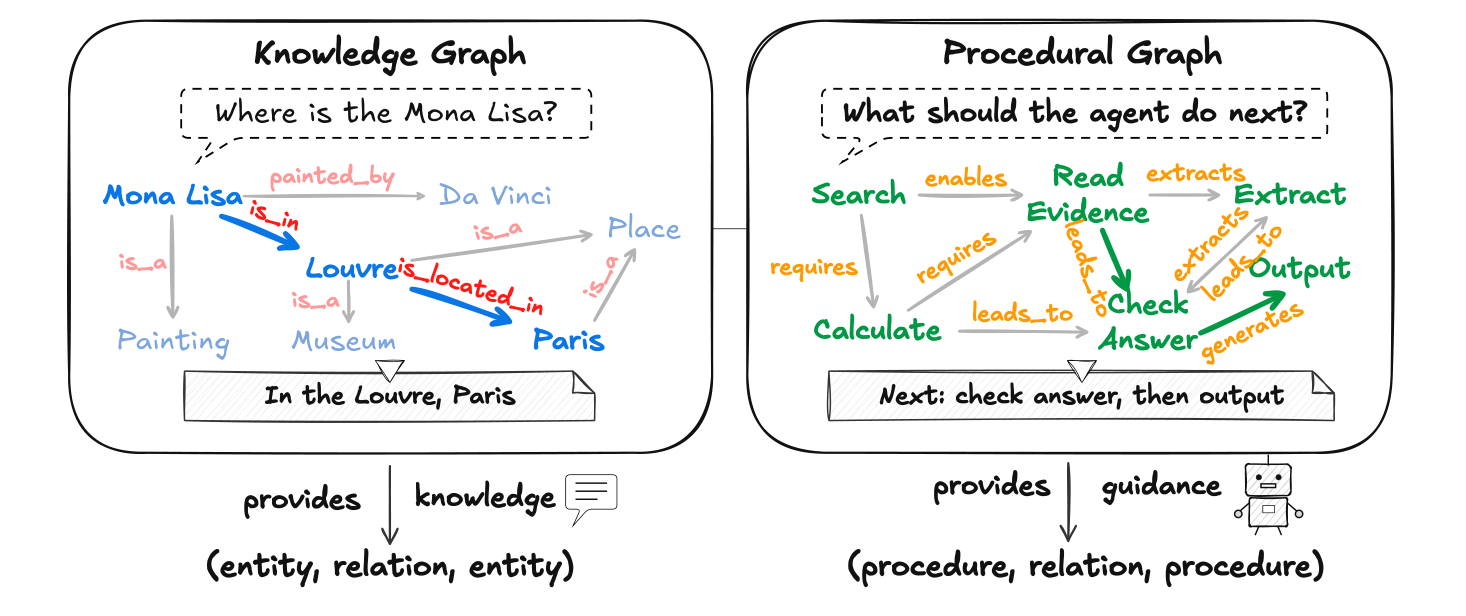
In short: ReAct’s problem is that at every step it has to infer the next move from a long log. The paper’s fix is to store “what to do next” in advance as a graph.
3 The core idea: store the workflow as a graph
The next three sections are the paper’s method: what the graph looks like (this section), how it is used at inference time, and how it is edited offline. First, the graph itself.
3.1 What the graph is made of
A Procedural Graph (PG for short) is a directed graph with attributes: nodes are steps, an edge (a directed arrow) says “after this step, you can continue with that one”, and each edge carries three pieces of text explaining how to continue (paper Section 3.1).
This post will keep using one example from the paper: EnterpriseArena, a financial simulation environment in which the agent plays a CFO (chief financial officer) managing company cash, with the goal of lasting 132 months without going bankrupt.
In this task’s graph there is an edge like this (the example in paper Section 3.1): (cash_flow_forecast, LEADS_TO, fund_raising_request), meaning that after the cash-flow forecast, the agent can go on to file a fundraising request. The three pieces of text on it are called condition (when to take this edge), guidance (how to do it) and pitfalls (what to avoid). Here they are:
| Field | Content |
|---|---|
| condition | When the projected cash runway falls below the safety buffer |
| guidance | File the request early, because funds arrive with a delay |
| pitfalls | Do not stack another request while one is still pending |
Those three sentences are the raw material that gets translated for the solver at inference time.
Generalizing the example: a PG is made of four things, namely nodes, relation types, edges, and the text on each edge. An edge is a triple of “start, relation, end”.
- : the set of nodes. A node stands for a tool function, a skill, an internal reasoning step, or a task state.
- : the vocabulary of relation types. There are only four in practice:
LEADS_TO,TRIGGERS,PROVIDES_INPUT_FOR,CONVERGES_TO(Appendix B.4). They are just labels; we will see later that they play no role at inference time. - : the set of edges. Each edge is , meaning “after , you may continue to through relation ”.
- : maps each edge to a set of text fields. The paper uses three: condition (when to take the edge), guidance (how to do it), pitfalls (what to avoid).
3.2 The graphs are small
The graphs in use are small. Apart from BFCL v3, which has to cover a huge function catalog and so has 131 nodes and 265 edges, every graph has only 7 to 17 nodes and 7 to 27 edges (see Table 1). The seven columns of Table 1 are the six benchmarks plus EnterpriseArena, which is not part of the six benchmarks in the main comparison of Experiment One and is used mainly for the self-evolution case study.

A graph can start from a hand-written expert version, or from an empty graph with only two nodes, Start → End. Experiment Three compares the two starting points.
In short: a PG is a small graph. Nodes are steps, and each edge says when to take it, how to do it and what to avoid. Next: how the agent uses the graph while working.
4 At inference time: look only two hops ahead
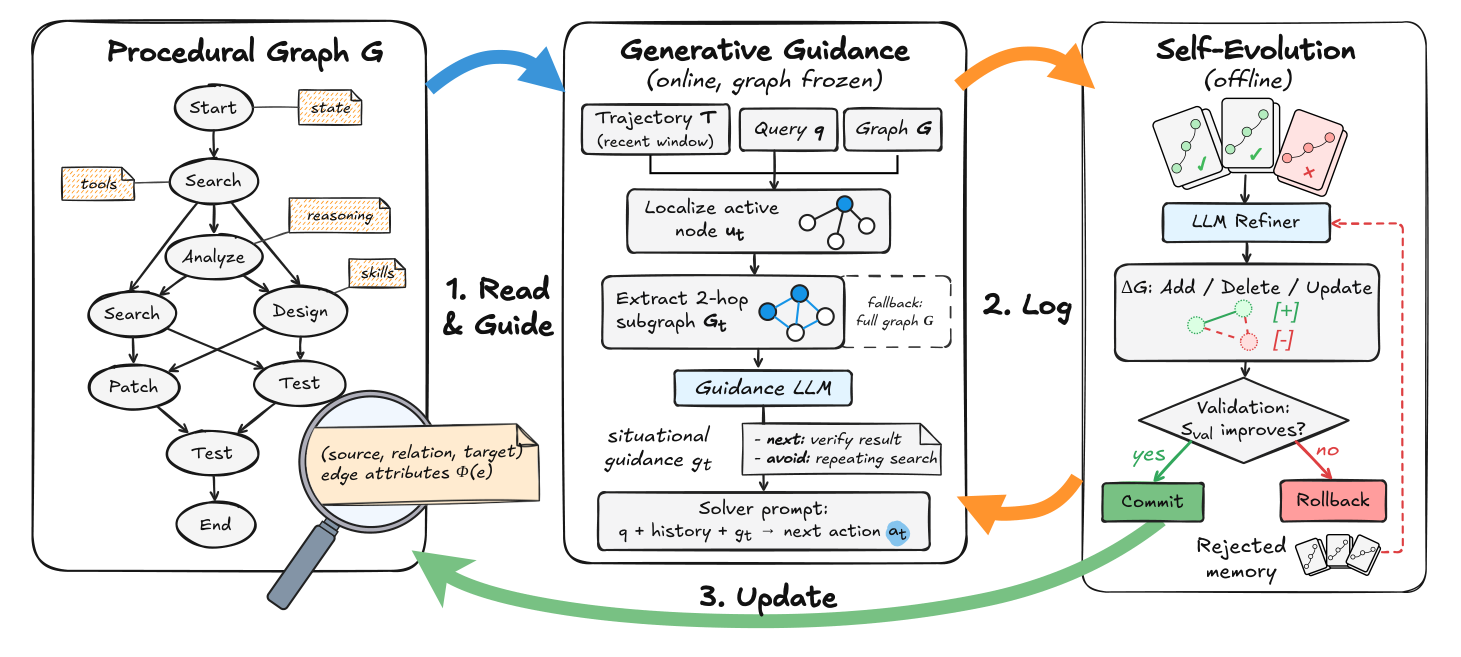
At inference time the method works like this. Before each decision, it works out which graph node the agent has just finished, takes only the small piece of the graph 2 hops out from that node (two steps along the arrows), and has another LLM turn it into a short piece of text saying “what to do now and what to avoid”, which is appended to the solver’s prompt. The graph is frozen at inference time and is not updated (Section 3.2).
The small piece of the graph that is taken out is called a subgraph. Let us define the two roles first:
- solver: the LLM that actually picks the next action; in other words, the agent itself inside the ReAct loop.
- guidance model (): another LLM that turns the subgraph into a hint. The paper says it uses the same underlying model as the solver (Section 4).
One full step goes like this (a trajectory is the record of actions and observations so far; the symbols in brackets are the ones the formulas use later):
- Take the previous action ().
- Match it to a node on the graph () and take the 2-hop subgraph ().
- The guidance model () reads the subgraph, the question () and the last 3 steps of the trajectory, and writes a hint ().
- The hint is filled into the
Procedural Graph Guidance:field of the solver’s prompt. - The solver outputs a Thought and an Action.
- The environment executes the action and returns an observation.
- The new action and observation are appended to the trajectory, and the next step begins.
cash_flow_forecast). The system finds that node on the graph and takes the edges up to two hops out from it. One of them says “when the projected cash runway falls below the safety buffer, file the request early, because funds arrive with a delay”. The guidance model writes these edges up as a reminder, and after reading it the solver decides whether the next action should be a fundraising request.Figure 2 gives an overview of the whole framework. Focus on the middle column (inference); the right-hand column is offline evolution, covered in the next section.
4.1 Locating the agent on the graph
The first part answers “where on the graph is the agent right now?”.
It works like first checking which junction you are standing at: take the previous action, look for the matching node on the graph, and if found, take two hops out from it; if not found, fall back to the whole graph.
- : which decision step we are at. By convention , so the first step is always located at the Start node.
- : the agent’s previous action, for example one tool call.
- : matches against the node set ; the paper writes exactly matching.
- : the matched node, i.e. where the agent currently is on the graph; if there is no match it is the empty set.
- : the subgraph obtained by expanding at most steps outward from along outgoing edges. The experiments use .
- : the graph handed to at this step. When matching fails, it falls back to the whole graph .
Appendix B.5 contains a serialized (turned into text) local graph from HotpotQA, in excerpt, which makes a good example. The previous action is first_hop_retrieve, located at First_Hop_Retrieve; the first hop is First_Hop_Retrieve → Scan_Index and the second hop is Scan_Index → Bridge_Extract. The two edges, with their conditions, guidance and pitfalls, are handed to together. The details of the matching mechanism are in an explainer at the end.
4.2 Writing the hint and picking the action
The second part generates the hint and picks the action.
The guidance model looks at the subgraph, the question and the last 3 steps of the trajectory and writes a hint; the solver then looks at the question, the full trajectory and that hint, and picks the next action.
- : the contextual hint at step , a piece of natural language.
- : the guidance model.
- : the user’s original question.
- : the trajectory of the last steps; the experiments use .
- : the full trajectory so far, a sequence of interleaved actions and observations.
- : the action the solver takes at this step. All experiments use greedy decoding (always take the most probable option), so in practice it is deterministic.
The instruction for (the Guidance Generation Prompt in Appendix B.5) asks it to follow the condition, guidance and pitfalls on the edges and to say clearly what to do next, what to avoid and how to recover after a recent failure, including the concrete command formats, tools and parameters mentioned in the graph. What each of the two LLMs sees and outputs is laid out in an explainer at the end.
4.3 Four properties to remember
This approach has four easily overlooked properties, all of them limits or costs:
- It biases; it does not force. The paper’s abstract says the hint will bias the solver’s next action but not dictate it. The paper has no mechanism that checks whether the solver’s action actually follows the graph.
- Every step makes one extra LLM call (the call itself), so it always costs more than no graph. The numbers are in Experiment Two.
- Falling back to the whole graph when matching fails is expensive. Experiment Two shows that the whole graph plus generated hints is the worst setting (mainly on ALFWorld, a virtual-household task), but the paper does not report how often matching fails, so we do not know how often this path is taken.
- The four relation types do nothing at inference time. Appendix B.5 says the serializer does not print relation labels for , so at least with this serialization sees only nodes, arrow directions and the three pieces of text.
In short: at inference time, at each step only the guidance model sees the subgraph two hops out, and it writes it up as a reminder; the solver sees no graph at all and reads only that reminder. The graph is frozen in this phase; how it gets better is the subject of the next section.
5 Offline evolution: an LLM edits the graph, a validation set guards it
The online half assumes the graph already exists. Where the graph comes from and how it improves is the job of the offline half.
The offline part works like this: first the solver runs a batch of training questions, leaving trajectories of successes and failures. The refiner (an LLM dedicated to editing the graph, built on the same underlying model as the solver) reads the trajectories and outputs a list of edits, which is applied to a copy of the graph to give a candidate graph. The candidate is adopted only if it does no worse than the current graph on an independent validation set. Rejected candidates are recorded (this record is called rejection memory) and shown to the refiner in the next round (Section 3.3, Algorithm 1).
%%{init: {'theme':'base', 'themeVariables': { 'primaryColor':'#dbeafe', 'primaryBorderColor':'#3b82f6', 'primaryTextColor':'#1e3a5f', 'lineColor':'#3b82f6', 'secondaryColor':'#eff6ff', 'tertiaryColor':'#eff6ff', 'clusterBkg':'#eff6ff', 'clusterBorder':'#93c5fd', 'edgeLabelBackground':'#ffffff' }}}%%
graph TB
    g["Current kept graph"]
    r["Run the solver on training questions; keep trajectories and scores"]
    p["The refiner proposes a list of edits"]
    c["Apply to a copy of the graph to get a candidate graph"]
    s["Structural check"]
    v["Score on the validation set"]
    ok["Adopt the candidate graph"]
    no["Revert to the old graph; add to rejection memory"]
    g --> r
    r --> p
    p --> c
    c --> s
    s -->|Passed| v
    s -->|Failed| no
    v -->|No worse than the old graph| ok
    v -->|Worse than the old graph| no
    ok -->|Next round| g
    no -->|Next round| g
Round goes like this:
- Using the currently kept graph , run the solver on a batch of training questions and record the trajectories and scores (0 to 1).
- The refiner compares high-scoring and low-scoring trajectories: in failures it looks for repeated error loops, in successes for shortcuts worth borrowing.
- The refiner outputs a list of edits .
- Apply the edits to a copy of the graph to get the candidate graph.
- Run the structural check; if it fails, throw the candidate away without validating.
- Score it on the validation set and compare with the old graph.
- If it is no worse than the old graph, adopt it; otherwise revert to the old graph and record this candidate in rejection memory.
5.1 How the refiner proposes edits
The refiner does not redraw a new graph. It writes a list of edits and applies it to a copy of the graph, which gives the candidate graph.
- : the graph kept from the previous round. A rejected candidate never becomes the starting point of the next round.
- : the list of edits proposed by the refiner.
- : applies the edits to a copy of the graph; if the configuration asks for it, cycles are also removed automatically.
- : the candidate graph.
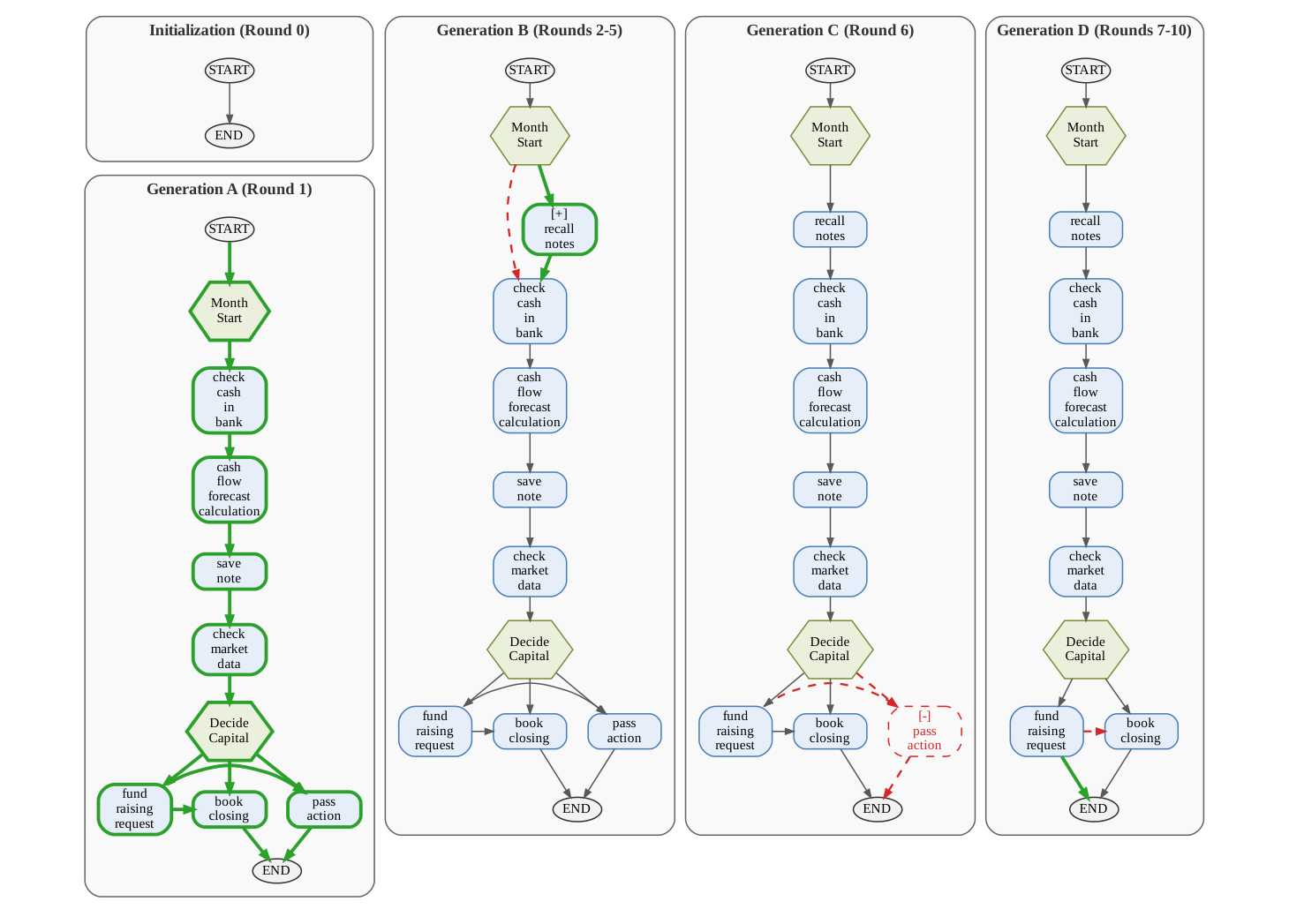
There are only two kinds of edit: Add (add a node or an edge, for example a verification step) and Delete (remove a node or an edge that keeps leading trajectories into failure). Changing an edge’s attributes means deleting it and adding it back with new attributes.
add_nodes, delete_nodes, add_edges, delete_edges (the Refiner Prompt in Appendix B.5). Deletions are applied before additions. One subtlety: delete_edges removes all edges between that start and end node, whatever their relation type, so to keep some of them you have to re-add them in add_edges.Appendix E.3 has a worked example, using the EnterpriseArena CFO task from earlier. In Round 1, starting from an empty graph with only Start → End, the whole main line grows in one go; Round 7 deletes the pass_action node (do nothing) and its edges; Round 8 replaces fund_raising_request → book_closing with a direct link to End. Figure 3 shows how the topology (how nodes and edges connect) changes step by step.
The structural check (Appendix B.6) looks at only three things: every edge endpoint must exist, nodes and relation types must be valid, and every node must have a path to a terminal node (a node with no outgoing edge counts as terminal). A candidate that fails is thrown away.
5.2 The validation gate: stopping edits that make things worse
The score on the validation set and the rule for adopting a candidate (together called the validation gate) work in two steps. Step one is scoring: run the solver on every validation question with the new graph and average the scores.
Step two is comparing: if the new graph’s average is no lower than the old graph’s, switch to the new one; otherwise keep the old one.
- : the validation set, separate from both the training batches and the test set.
- : one question and its reference answer.
- : the solver’s output when using graph ; is the score of a single question, so is the average score on the validation set.
- The comparison uses , so a tie is also accepted. The old graph’s score is cached and not recomputed.
Why an independent validation set? Because the refiner proposed its edits after seeing the training trajectories, so an edit that works on the training batch is not necessarily really effective. It is like someone who memorized past exam papers: a high score on those papers does not prove they learned the material; you need a fresh set of questions to find out.
How the ten rounds go. Table 2 is Table 11 of Appendix E, a self-evolution run on EnterpriseArena with Gemini 3.5 Flash. The gate’s rule (the paper does not name the metric; below I explain why I suspect it is survival rate) is: accept the new graph if its validation survival rate is no lower than that of the currently kept graph, otherwise reject it. The denominator is the 20 episodes (complete simulation runs) of the validation set, so 1 episode is worth 5 percentage points; survival rate means the share of runs that last the full 132 months without bankruptcy.
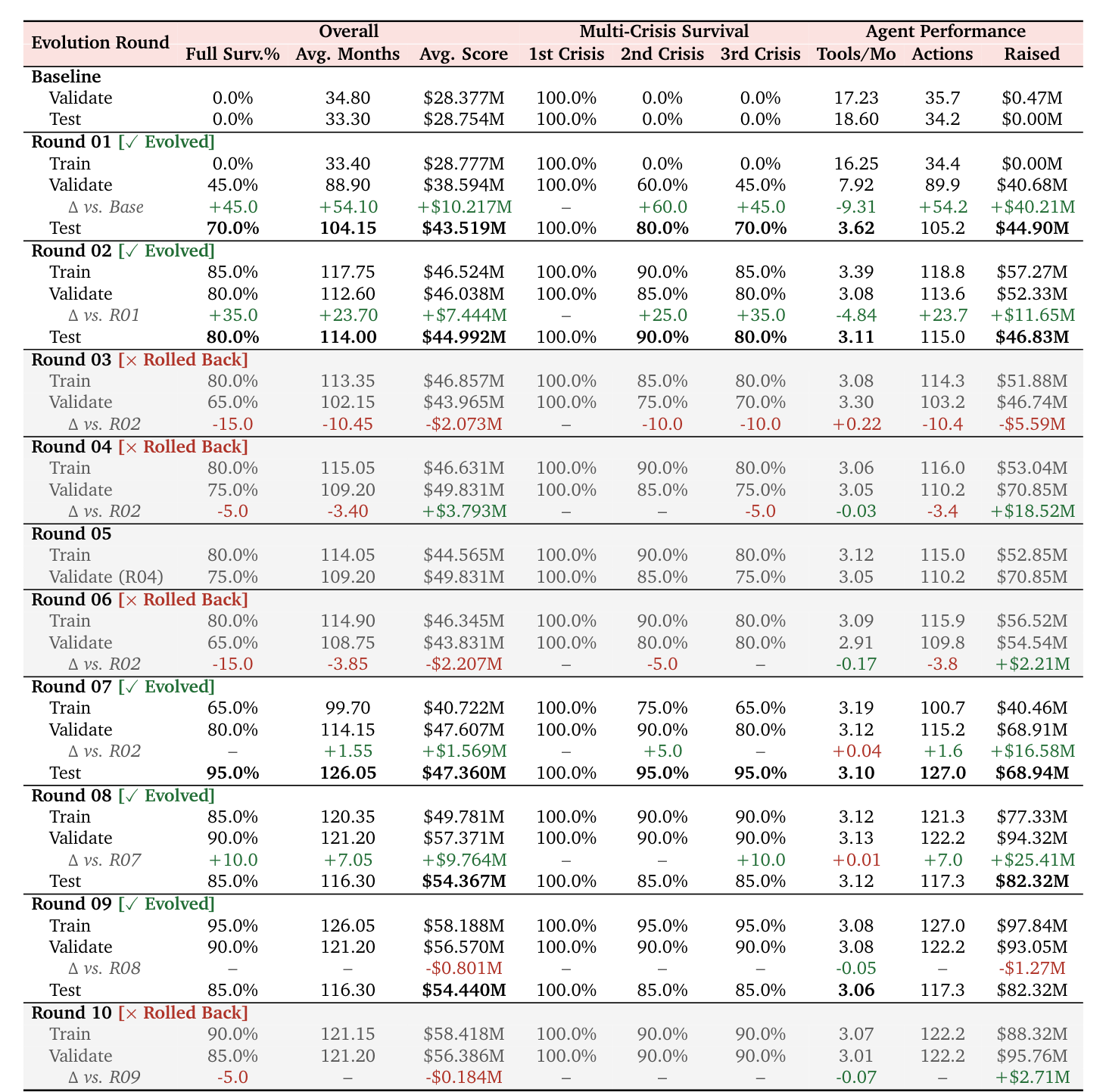
Here is the decision process from that table, laid out:
| Round | New graph’s survival rate | Compared against (currently kept graph) | Result | Graph kept after this round |
|---|---|---|---|---|
| R1 | 45.0% (9/20) | 0.0% (the initial empty graph) | Accept | R1 |
| R2 | 80.0% (16/20) | 45.0% | Accept | R2 |
| R3 | 65.0% (13/20) | 80.0% | Reject | R2 |
| R4 | 75.0% (15/20) | 80.0% | Reject | R2 |
| R5 | Failed the structural check; not validated | 80.0% | Reject | R2 |
| R6 | 65.0% (13/20) | 80.0% | Reject | R2 |
| R7 | 80.0% (16/20) | 80.0% | Tie, accept | R7 |
| R8 | 90.0% (18/20) | 80.0% | Accept | R8 |
| R9 | 90.0% (18/20) | 90.0% | Tie, accept | R9 |
| R10 | 85.0% (17/20) | 90.0% | Reject | R9 |
The rightmost column is the point: the kept graph only moves forward and never goes back. R3 to R6 were all rejected, so after those four rounds the graph in hand was still R2. R10’s training survival rate was 90.0% but its validation rate was only 85.0%; what got blocked was an edit that only worked on the training batch (Appendix E.2).
- The paper does not say which metric uses in this experiment. But the decisions in Table 2 fit only survival rate. This is my guess: the gate actually looks at survival rate. (The evidence for the guess is in the collapsed box below.)
- When the validation set is tiny, accepting or rejecting is mostly noise. With 20 episodes, 1 episode is 5 percentage points. The paper itself says that a single decision hinges on one or two episodes and should be read as a record of the search, not as a significance test (Section 5.4). Ties are accepted too, so noise can also push the graph forward.
5.3 Rejection memory: remembering what was thrown out
The last component is rejection memory: a record of the edits that were thrown out.
A rejected edit does not simply vanish. When the refiner proposes edits in the next round, besides the current graph and the new batch of trajectories it also sees the candidates that were rejected, as a reminder of “don’t propose this kind again”.
- : the currently kept graph.
- : the training trajectories for the next round; if longer than the length cap , the beginning is cut and the end is kept.
- : the history of rejected candidates, used as negative evidence of “don’t propose this kind again”.
What happens after a rejection is simple: the graph stays the same, one entry is added to the record, and the next round reruns the same graph on the next batch of training questions before the refiner proposes new edits. The loop runs a fixed rounds and does not stop early because of a rejection. What each record holds and what the refiner actually sees is covered in an explainer at the end.
Here is one round from Appendix E.2: in R3 the cash threshold that triggers fundraising was lowered. It worked on the training seeds (think of them as random starting points of the simulation) but on the validation set it caused premature dilution and a cash shortfall, validation survival rate fell from 80.0% to 65.0%, and the edit was rejected.
In short: the offline half boils down to three moves: propose (the refiner edits the graph), guard (an independent validation set), and feed back the rejections (rejection memory).
6 The whole method in one table
Let us put the components together and look at the whole picture once more.
The method has seven components: three in the online phase, three in the offline phase, plus the graph itself, shared by both.
| Component | In one sentence | Input | Output | When |
|---|---|---|---|---|
| Graph | Steps and what can follow them, with condition / guidance / pitfalls on the edges | - | - | Shared by both phases |
| Localize + take subgraph | Find the current node and take the hop subgraph | Previous action, | Subgraph | Online |
| (guidance model) | Turns the subgraph into a hint for right now | , , last 3 steps | (text) | Online |
| solver | Picks the next action | , full trajectory, | Thought + Action | Online |
| refiner | Reads trajectories and proposes a list of graph edits | Current graph, training trajectories, scores, | List of edits (JSON) | Offline |
| Validation gate | Accepts a candidate only if its validation score is no lower than the old graph’s | Candidate graph, validation set | Accept or reject | Offline |
| Rejection memory | Records the edits that were thrown out | Rejected candidates and their evidence | Reference for the refiner’s next round | Offline |
7 Experiment One: 23 of 24 improve, with discounts
Each of the three experiments answers one question: does it help overall (Experiment One), does the core design really contribute (Experiment Two), and where should the graph come from (Experiment Three). First, Experiment One.
This section uses two comparisons. Against plain ReAct without memory (same model, same solver), 23 of 24 cells improve, but HotpotQA barely improves. Against the strongest baseline in each cell, the paper’s own claim is that PG comes first or ties for first in 21 of the 24 “model × benchmark” cells; the details are in the collapsed box below.
Setup (Section 4): 4 LLMs (Claude Sonnet 4.6, Gemini 3.1 Pro, Gemini 3.5 Flash, Grok 4.1 Fast), 6 benchmarks and 7 comparison methods (baselines). All methods share the same ReAct solver and differ only in how experience is stored and used. The guidance model and the refiner use the same LLM as the solver, and everything uses greedy decoding.
The seven comparison methods roughly fall into these groups: Vanilla ReAct stores nothing; MemoryBank, RAP, ExpeL and AWM store text such as experience summaries, past trajectories, distilled lessons or workflows; AutoGuide stores conditional guidance of the form “in state X, do Y”; KnowAgent stores rules about which action can follow which. Each one is covered in an explainer on baselines at the end.
The six metrics and their test sizes: the number of questions determines how much each question is worth. GDPval has only 44 questions, so one question is worth about 2.3 points, and a small gap can easily be just noise.
| Benchmark and metric | What it tests | Test questions |
|---|---|---|
| HotpotQA Acc. | Whether a multi-hop question is answered correctly (an LLM judge decides equivalence with the reference answer) | 1,000 |
| MultiChallenge Acc. | Whether, in a multi-turn conversation, earlier instructions are remembered and followed (overall success rate from an LLM judge) | 166 |
| GDPval Rubric Score | Average score of professional deliverables graded against a per-task rubric | 44 |
| ALFWorld Success | Success rate on virtual household tasks, where the order of actions is strictly required | 134 |
| -bench Pass@1 | Customer-service scenarios: the share of runs where the final database state equals the reference | 115 |
| BFCL v3 Acc. | Accuracy of multi-turn function calling | 100 |
The numbers in brackets in Table 3 are confidence intervals: read them roughly as “the range this score probably falls in”. The wider the range, the less certain the score.
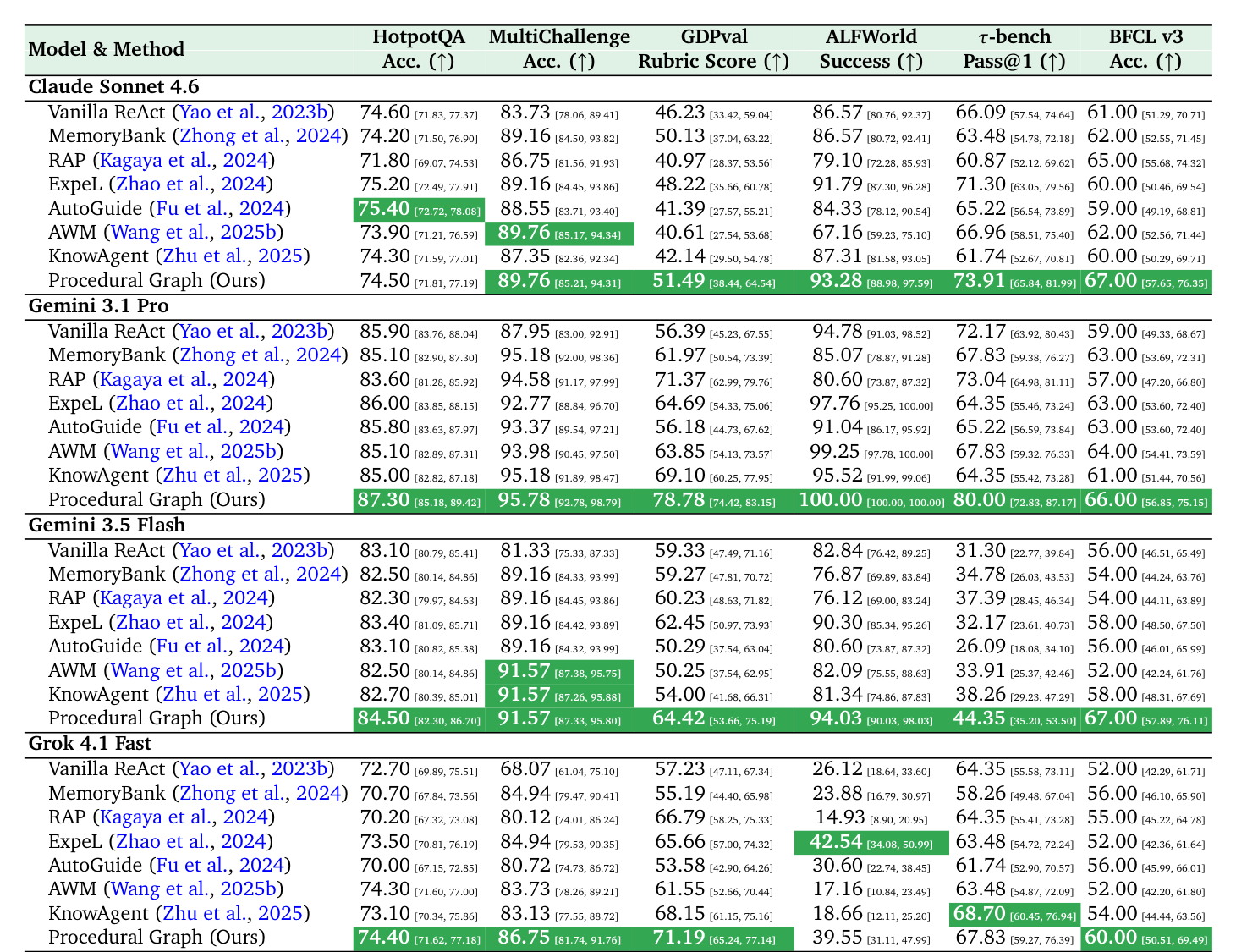
The clean comparison: PG minus plain ReAct without memory, same model and same solver, in points.
| Model | HotpotQA | MultiChallenge | GDPval | ALFWorld | -bench | BFCL |
|---|---|---|---|---|---|---|
| Claude Sonnet 4.6 | -0.10 | +6.03 | +5.26 | +6.71 | +7.82 | +6.00 |
| Gemini 3.1 Pro | +1.40 | +7.83 | +22.39 | +5.22 | +7.83 | +7.00 |
| Gemini 3.5 Flash | +1.40 | +10.24 | +5.09 | +11.19 | +13.05 | +11.00 |
| Grok 4.1 Fast | +1.70 | +18.68 | +13.96 | +13.43 | +3.48 | +8.00 |
A few things can be read off this table:
- 23 of 24 cells are positive; the only negative one is Claude on HotpotQA (-0.10).
- HotpotQA barely improves: +1.7 at most, smaller than the width of the confidence interval in that column. The other five benchmarks gain +3.48 to +22.39.
- “Beating the baselines” needs a discount, because quite a few baselines are themselves worse than no memory. For example, on ALFWorld with Gemini 3.1 Pro, no memory scores 94.78, MemoryBank 85.07 and RAP 80.60. So part of the 19 wins against the strongest baseline in each cell comes from rivals getting worse; only the comparison with no memory shows PG’s own contribution.
In short: overall it helps, but with three discounts: HotpotQA barely improves; some of the wins come from rivals getting worse; and there is a possible confound that I suspect (this is my guess, and the paper does not acknowledge it) about whether the comparison is fair.
8 Experiment Two: the whole graph hurts, the nearby piece helps
Local subgraph plus generated hints is the best setting on all three benchmarks; the whole graph hurts, especially on ALFWorld, which needs strictly ordered actions. This is the only experiment that directly tests the core design (take a local subgraph, then have turn it into a hint) (Section 5.5).
Setup: the same graph and the same model (Gemini 3.5 Flash), changing just two things: whether the agent sees the whole graph or a local subgraph, and whether the graph is pasted in as raw text or first turned into a hint by . Four combinations are compared:
- No graph: PG is not used.
- Whole graph + raw insertion: the whole graph is serialized and put straight into the prompt, without .
- Whole graph + generated: the whole graph is handed to to turn into a hint.
- Local subgraph + generated: the paper’s full method.
Both cost metrics are lower-is-better: Avg. Tok is the average number of tokens used per question (including the calls to ), and Avg. Step is the average number of steps the solver takes per question.

Accuracy (in points, higher is better):
| Setting | MultiChallenge | GDPval | ALFWorld |
|---|---|---|---|
| No graph | 80.27 | 54.80 | 72.58 |
| Whole graph + raw insertion | 86.60 | 57.17 | 70.34 |
| Whole graph + generated | 87.35 | 56.75 | 54.48 |
| Local subgraph + generated | 89.31 | 63.99 | 81.53 |
Cost: tokens as a multiple of no graph (computed from the raw token counts in Table 4):
| Setting | MultiChallenge | GDPval | ALFWorld |
|---|---|---|---|
| Whole graph + raw insertion | 1.53× | 0.96× | 1.17× |
| Whole graph + generated | 2.18× | 1.63× | 5.34× |
| Local subgraph + generated | 1.85× | 1.33× | 1.55× |
Three things follow from these two tables:
- The local subgraph is the highest on all three benchmarks, beating the runner-up on each by 1.96, 6.82 and 8.95 points.
- The whole graph hurts. ALFWorld drops from 72.58 to 54.48, while tokens are 5.34 times those of no graph. My guess: ALFWorld needs strictly ordered actions, and still writes the irrelevant branches of the whole graph into the hint. The paper gives only the result, not the mechanism.
- The local subgraph always costs more than no graph. Its tokens are 1.33 to 1.85 times those of no graph. Steps do go down on GDPval (28.20 to 18.57) and ALFWorld (21.84 to 18.80), but on MultiChallenge they go up from 3.87 to 4.22.
In short: this is the evidence for “the satnav only announces the next road or two”: taking just the nearby subgraph beats reading the whole graph to the agent. But even taking just the nearby part still costs more than using no graph.
9 Experiment Three: a hand-written graph can crash, evolution can rescue it
This experiment tests two things: whether self-evolution helps, and whether it can repair a broken expert graph. There is only one solid signal: on MultiChallenge the expert graph can make the score crash, and evolution can rescue it. Whether an empty-graph start can match the expert graph cannot be told from the MultiChallenge data (Section 5.3).
Setup: the same model (Gemini 3.5 Flash, Appendix D.3), varying “where the graph comes from and how it is updated”, for five combinations (Appendix D.2):
| Mode | Start | Update method | Validation gate |
|---|---|---|---|
| 1 | Hand-written expert graph | No updates | No |
| 2 | Hand-written expert graph | One big edit after running the whole training set | No |
| 3 | Hand-written expert graph | Batch-by-batch evolution | Yes |
| 4 | Empty graph (Start → End) | One big edit | No |
| 5 | Empty graph | Batch-by-batch evolution | Yes |
The difference between “batch-by-batch evolution” and “one big edit” is this:
| One big edit | Batch-by-batch evolution | |
|---|---|---|
| Process | Run the whole training set with the starting graph; the refiner reads all trajectories and outputs one large edit, which is adopted directly; done | The training set is split into batches. For each batch in turn: run with the current graph, the refiner proposes edits, the validation set guards them (accept or reject), then run the next batch with the (possibly updated) graph, until the last batch |
| Iterations | One round | Many rounds |
| Validation gate | No | Yes |
The table uses two metrics: for HotpotQA, whether the answer is exactly identical to the reference (EM); for MultiChallenge, whether the whole conversation followed all instructions (Overall). HotpotQA is tested on 1,000 questions, so 1 question is worth 0.1 points; MultiChallenge uses only 56 of its questions in this table (Experiment One used 166, and the paper does not say why only 56 are used here), so 1 question is worth 1.79 points, and each question’s gap matters on MultiChallenge. The full explanation of the metrics and denominators is collapsed below.
- Ans EM (Exact Match): the answer string must be identical to the reference to count as correct; it measures only the final answer. The paper also reports Ans F1 (how much the words of the answer overlap with the reference, more lenient than EM) with the same trends; here only EM is used.
- MultiChallenge Overall: the success rate at which an LLM judge decides that the whole conversation followed all instructions. MultiChallenge also has four sub-metrics (Inference Memory, Instruction Retention, Reliable Versioned Editing, Self Coherence); only Overall is used here.
- Denominators: HotpotQA is tested on 1,000 questions, so 1 question is worth 0.1 points. MultiChallenge uses only 56 questions in this table (Appendix B.1; Experiment One’s test set has 166 questions, and the paper does not say why only 56 are used here), so 1 question is worth 1.79 points.

Results:
| Mode | HotpotQA EM | Difference from no graph | MultiChallenge Overall | Difference from no graph |
|---|---|---|---|---|
| No graph | 58.8 | - | 87.50 (49/56) | - |
| 1 Hand-written expert graph | 62.8 | +4.0 | 58.93 (33/56) | -16 questions |
| 2 Expert graph + one big edit | 63.8 | +5.0 | 53.57 (30/56) | -19 questions |
| 3 Expert graph + batch evolution | 63.1 | +4.3 | 92.86 (52/56) | +3 questions |
| 4 Empty graph + one big edit | 55.4 | -3.4 | 89.29 (50/56) | +1 question |
| 5 Empty graph + batch evolution | 66.3 | +7.5 | 91.07 (51/56) | +2 questions |
Three conclusions:
- On HotpotQA, only mode 5 (empty graph + batch evolution) is clearly the best. It answers 75 more questions correctly than no graph. Modes 4 and 5 both start from an empty graph, and their EM differs by 10.9; mode 4 (empty graph + one big edit), which is worse than no graph, answers 34 fewer questions correctly.
- On HotpotQA, evolution adds nothing extra when starting from an expert graph. Mode 3 (expert graph + batch evolution, 63.1) is only 0.3 above mode 1 without updates (62.8), and below mode 2 (expert graph + one big edit, 63.8). The three expert-graph modes all lie between 62.8 and 63.8, while mode 5, which starts from an empty graph, reaches 66.3.
- The solid signal on MultiChallenge is that “an expert graph can make the score crash, and evolution can rescue it”. Modes 1 and 2 are 16 and 19 questions below no graph, and mode 3 recovers from mode 1’s 33 questions to 52, a difference of 92.86 − 58.93 = +33.93, which matches the number reported in the paper. But modes 3, 4 and 5 differ from each other by only 1 question and from no graph by only 1 to 3, so you cannot say which is better, and you cannot say that “starting from an empty graph catches up with the expert graph”.
The clean comparison (the method’s own contribution): same starting point, comparing only what is gained by adding evolution and the gate.
| Start | Modes compared | HotpotQA EM | MultiChallenge |
|---|---|---|---|
| Expert graph | Mode 3 vs mode 1 | +0.3 | 19 more questions |
| Empty graph | Mode 5 vs mode 4 | +10.9 | 1 more question |
In short: the most solid statement from this experiment is that a hand-written expert graph can make the score crash on MultiChallenge, and batch-by-batch evolution with a validation gate can rescue it (this data shows only the result, not the cause). Whether an empty-graph start can match the expert graph cannot be told from the MultiChallenge data.
10 What to take away
So far this was about what the paper did. This section is about how to use it on your own things, and wraps up. What is most worth taking away is, in fact, not the graph.
10.1 The improvement loop: propose, validate independently, feed back rejections
Let an LLM propose edits to some text asset (a prompt, rules, a skill, a graph); measure the old and new versions on data it has not seen; adopt the new version only if it is no worse; record the rejected ones and show them to the LLM with the next proposal. This has nothing to do with graphs and works on any editable text asset.
For example, say you have a system prompt you use often: let an LLM propose edits based on a few failed conversations, score the result on a batch of conversations it has not seen, switch to the new version only if it is no worse, and keep the rejected edits to show it with the next proposal.
asset = initial version;  rejected = []
score_asset = evaluate(asset, VAL)            # score the initial version once, cache it
for round in 1..K:
    traces   = run(asset, TRAIN_BATCH[round]) # run the current version on a new batch of training data
    proposal = LLM_propose(asset, traces, rejected)
    cand     = apply(asset, proposal)
    if not valid(cand): rejected.append(proposal); continue
    score_cand = evaluate(cand, VAL)
    if score_cand >= score_asset: asset, score_asset = cand, score_cand
    else: rejected.append((proposal, cand, score_cand))
10.2 Limits to remember
All of this loop’s limits have shown up earlier:
- Hill climbing cannot reach a design that requires getting worse first.
- When the validation set is tiny, what the gate accepts is mostly noise.
- A constraint that exists only in the prompt and is not checked by the validator is no constraint at all (the refiner inventing a tool node that does not exist is an example).
When you apply the loop to your own asset, the first things to check are whether the validation set is big enough and whether the constraints are checked by code.
10.3 Choosing a gate
This is general knowledge, not from the paper: start with this kind of greedy gate (one that only accepts versions no worse than the current one); only when the validation score has stood still for many rounds, and the validation data is big enough, consider approaches that can accept a worse version or keep several candidates at once.
10.4 Conclusion
PG stores an agent’s workflow as a graph with attributes. At inference time it takes only the subgraph 2 hops out from the current position and has another LLM turn it into a hint; offline, a refiner edits the graph and an independent validation set guards the edits. Compared with ReAct without memory, it wins 23 of 24 cells, but HotpotQA barely improves, and the cost is about 1.33 to 1.85 times the tokens.
The points to take away:
- Local subgraph plus generated hints is the best way to use the graph; the whole graph hurts, especially on ALFWorld, which needs strictly ordered actions.
- On MultiChallenge an expert graph can make the score crash, and evolution plus a validation gate can rescue it; but on HotpotQA, evolution adds nothing extra when starting from an expert graph, and whether an empty-graph start can match the expert graph cannot be told from the MultiChallenge data.
- A validation set that is too small, a gate that accepts ties, and constraints that live only in the prompt are the things to watch most when using this mechanism in practice.
- What is most worth taking away is the improvement loop itself: propose, guard with an independent validation set, and feed back the rejections. It does not depend on graphs and works on any editable text asset.
If you remember only three sentences:
- The satnav only announces the next road or two. Store “what to do next” as a graph; at each step take only the two hops around the agent and have another LLM turn them into a reminder for the agent. The reminder only biases; it does not force.
- Propose, guard, feed back the rejections. An edit is adopted only if it is no worse on a validation set that was never seen, and rejected edits are recorded.
- 23 / 24, but with a cost. It improves in most cases, but HotpotQA barely gains, every step makes one extra LLM call, and a hand-written expert graph can even make the score crash on MultiChallenge.
Next time someone says “we gave the agent memory”, you can ask three questions: is what it stores free text, or something with structure? At inference time, is all of it stuffed in, or only what is needed right now? And are the changes guarded by data that was never seen?
11 Further reading: five stand-alone explainers
The five parts below are independent of each other and can be read without the main story. They explain the steps that the main text only touched on but that are easiest to forget.
11.1 Localization and the subgraph: how the previous action maps to a node
In one sentence: at each step, use “the agent’s previous action” to find its current position on the graph, then expand a fixed number of steps along outgoing edges and hand only that small piece of graph to the next stage. This part explains what and in the first part of the inference method actually do.
Where does the previous action come from? It is not computed separately; it is simply the Action line the solver itself wrote in the previous step. The solver prompt requires exactly one Thought and one Action per step, in the format Action: <tool_name>(arg1=val1, ...) (Appendix B.5), and this line is recorded into the trajectory as is. So is the last action in the trajectory, for example fund_raising_request(type='equity', amount=50000000).
What exactly does “exactly matching” compare? The paper only says exactly match and gives no details:
- The whole line (with arguments), or only the tool name? Not stated.
- A node can also be a reasoning step or a task state (Section 3.1), for example
Decide_CapitalorMonth_Start, which do not correspond to any tool call. How are they matched? Not stated. - My guess: what is compared should be the tool name, because the refiner prompt requires ACTION nodes to equal available tool names (Rule 1 in Appendix B.5). But in the example in Appendix B.5 the node is called
First_Hop_Retrieveand the toolfirst_hop_retrieve, which differ in case, so “exact” probably follows some normalization.
The paper also shows only the result of matching (the Active Cognitive Node in the serialized example), not the matching step itself.
What the paper actually says, and the usual names in implementations
| Stated in the paper | Not stated (general knowledge or guess) |
|---|---|
| Exactly match the most recent action to one node on the graph, giving | What data structure is used for matching. A common approach is a dictionary lookup: node name to node; if found, that is , if not, it is empty |
| From , expand along outgoing edges for at most steps and collect the nodes and edges reached | This expansion is usually called breadth-first search (BFS): collect everything on one level before moving to the next |
| If there is no match, use the whole graph; the experiments use | How often matching fails |
Dictionary lookup and BFS are just the usual programming names, not content from the paper. Matching looks only at whether strings agree, without embeddings (turning text into a string of numbers so similarity can be computed) or any similarity score, so the result is deterministic.
A manual walk-through. The list of edges is below; the first two come from the HotpotQA excerpt in Appendix B.5, and the last two are made-up examples:
First_Hop_Retrieve → Scan_IndexScan_Index → Bridge_ExtractBridge_Extract → Second_Hop_Retrieve(made up)Second_Hop_Retrieve → Answer(made up)
Suppose the agent’s previous action is first_hop_retrieve and :
- Find the node: the one in the list whose name matches is
First_Hop_Retrieve; this is . - Step 1: find the edges that start at , which gives the first edge, and collect
Scan_Index. - Step 2: find the edges that start at
Scan_Index, which gives the second edge, and collectBridge_Extract. - , so stop; the third and fourth edges are not collected.
- is the first and second edges, together with their condition, guidance and pitfalls.
When matching fails (the previous action cannot be found on the graph), is all four of these edges. The serialized example in Appendix B.5 lists the edges grouped by “Hop 1” and “Hop 2”, which is consistent with this approach.
Three details of the expansion:
- Follow only outgoing edges, i.e. the direction of the arrows. Nodes you came from are not in the subgraph; that history is supplied by the window of the last steps of the trajectory.
- At a fork, all outgoing edges at the same level are collected together. For example, in the later EnterpriseArena graph,
Decide_Capitalis followed byfund_raising_requestandbook_closing, both on the first hop. - A made-up example: EnterpriseArena’s main line is
Month_Start → check_cash_in_bank → cash_flow_forecast_calculation → save_note → check_market_data → Decide_Capital. If ischeck_cash_in_bankand , the subgraph collectscash_flow_forecast_calculation(first hop) andsave_note(second hop) and stops there;check_market_datais on the third hop and is not collected.
Why follow the structure instead of retrieving by similarity? This is the argument in Section 3.2: independent top-k similarity retrieval (picking the k most similar items) can miss the connections between steps. For example, it may retrieve the guidance for submit but not the transition from the earlier check_answer, and so miss the verification step that makes submitting sensible. Taking a neighborhood along the structure brings out both the action and its procedural prerequisite.
11.2 Ψ and the solver: what each one sees and outputs
At inference time two LLMs each have their own job. (the guidance model) reads the graph and writes a short hint; the solver cannot see the graph, reads only the hint wrote, and then picks the action. The table lists only what the paper actually gives (the two prompt templates in Appendix B.5), and marks what is not made clear.
| Item | (guidance model) | solver |
|---|---|---|
| Role | Turns the subgraph into the hint for right now | Picks the next action |
| Graph it sees | The serialized local subgraph: node IDs, types, descriptions, plus each edge’s condition / guidance / pitfalls, grouped by Hop 1 and Hop 2 | It cannot see the graph, only the that wrote |
| Trajectory it sees | The last steps | The full trajectory |
| Task description | Yes (the task_description field of the template) | In the system_prompt (a guess) |
| User question | Yes (the query field of the template; see the second point below) | The template has no separate field; a guess is that it is in the system prompt or the trajectory |
| Instruction | Following the three attributes on the edges, write clear, actionable advice: what to do next, what to avoid, how to recover after a failure, including the concrete command formats, tools and parameters mentioned in the graph | A fixed format: output only one Thought and one Action each time, and never write an Observation yourself |
| Output | : free text, with no format specified in the paper | Thought: ... plus Action: tool_name(arg=val, ...) |
The overall data flow is the same as the seven steps in the second part of the method, so it is not repeated here.
Three points are easy to misunderstand:
- The solver cannot see the graph itself at all. The graph’s information reaches it only through the text from , so how well writes directly decides whether the graph is useful.
- The query field of can be read in two ways, and the paper does not settle which. The prompt in Appendix B.5 describes it as the current active query / observation, but the paper’s formula writes it as the user’s question . If it is the original question, sees the same sentence at every step; if it is the latest observation, reacts to what just happened. The latter better explains hints like “avoid: repeating search” in Figure 2, but that is a guess.
- The full actual output of is not shown in the paper. The in the middle column of Figure 2 is only an illustration.
Below is a made-up , an imagined output based on the guidance and pitfalls of those two edges in Appendix B.5; it is not text from the paper:
11.3 One graph per benchmark
This part tries to answer: if a benchmark contains many kinds of tasks, how can one graph serve them all? First the paper’s approach: each benchmark has only one graph, and evolution just edits that single graph from to ; the refiner’s input is a single graph and its output is only four kinds of edit, so there is no decision about “which graph to pick” or “whether to add another graph”.
Why we say there is only one graph. Each column of Table 1 is a benchmark, with one pair of node and edge counts. The refiner’s input field is the single currently kept graph (current_graph_json in Appendix B.5); the output format has only add_nodes, delete_nodes, add_edges and delete_edges, all of which edit that one graph, with no operation to create a new graph.
What “starting from scratch” means. It means the starting graph has just two nodes, Start → End (modes 4 and 5 in Appendix D.2). The refiner still works by running add_nodes and add_edges on this empty graph; Round 1 of EnterpriseArena fills in the whole main line this way in one go (Appendix E.3). So “generating from scratch” is, in essence, still editing an existing graph.
What if a benchmark has very diverse tasks? The paper serves a whole benchmark with one graph. For example, GDPval covers tasks from different professions and still has just one graph of 15 nodes, relying on the localization mechanism so that each step takes only a small part of the graph. The paper does not discuss switching between graphs by task type, and has not tested multiple graphs or heterogeneous tasks.
What if one graph contains unrelated subgraphs that should not be connected? The paper does not discuss this situation and has not analyzed what happens when unrelated subgraphs sit in one graph. In the table below, the left column is what the paper says, and the right column is what I infer from it:
| The paper says | Guess |
|---|---|
| The conditions the structural check lists are only that endpoints exist, types are valid, and every node can reach a terminal node; it does not list the graph being connected, or reachable from Start (Appendix B.6) | Subgraphs that should not be connected can stay separate, as long as the refiner does not add connecting edges |
| Step one is always located at Start, taking the 2-hop subgraph | Start has to connect to the entrance of each subgraph, so the first step’s subgraph mixes the first two layers of every kind of task, and (which sees the task description and the query) has to filter them itself |
| Localization looks only at which node the previous action maps to | The graph has no memory of the path: the same node, whatever kind of task it is, yields the same neighborhood |
| The gate compares the average score on the validation set and accepts if it is no lower than the old graph’s | An edit that helps type A and hurts type B is accepted as long as the average does not drop; the paper does not break the analysis down by task type |
An example with a shared node (made up): both kinds of task call search. For type A, search is followed by verify; for type B, search is followed by summarize. The graph has only one search node, so both outgoing edges enter the neighborhood, and can only guess from and the last 3 steps of the trajectory which one to use.
The paper does show that “irrelevant graph content hurts”: in Table 4 (Gemini 3.5 Flash), the whole graph plus generated hints is the worst setting, with an ALFWorld success rate of 54.48 against 81.53 for the local subgraph. Taking a local subgraph is the mitigation, but it works only when localization succeeds and the neighborhood itself is not mixed.
Conclusion: the paper does not deal with heterogeneous tasks: one graph per benchmark, and how unrelated tasks coexist is not explained. It relies on localization (“previous action → node”) plus filtering by the LLM , and has no routing by task type. My guess: it makes the most sense for tasks with similar flows, such as EnterpriseArena, which runs the same main line every month; whether mixing heterogeneous tasks in one graph works has not been tested.
11.4 The refiner’s inputs, training trajectories and the rejected history
In each round the refiner sees "the current graph, this batch of training trajectories, and the history of rejected candidates", plus the task background; each entry in records "what was changed last time, what graph that produced, and why it was rejected".
First a definition: what is a training trajectory? It is the full record of what the solver actually did on a training question: from start to finish, each step’s action and the observation the environment returned, plus the final score (Section 3.3 Step 1).
- : the batch of questions drawn from the training set in round .
- : the question of the -th item.
- : the solver’s trajectory on this question, i.e. , with actions and observations interleaved.
- : the final score of this question, ranging from 0 to 1; for a binary task it is success or failure.
The that appeared in the rejection memory section is the trajectories of this concatenated, and truncated if necessary.
In plainer words: for each question in the batch there is one record of "the question, how it was solved, and what score it got", and the refiner compares high-scoring and low-scoring processes across this data. The paper’s formula mentions only actions and observations, but the Current Trajectory field of the solver prompt and the traces in Appendix C.3 both contain Thought, so I guess also includes Thought.
The refiner’s inputs
| # | Input | Content |
|---|---|---|
| 1 | The currently kept graph | , serialized as JSON |
| 2 | This round’s training trajectories | The trajectories from running on this batch of training questions, concatenated; if longer than , the beginning is cut and the end kept |
| 3 | Score of each question | The final score of each question, for the refiner to compare high-scoring and low-scoring trajectories |
| 4 | The rejected history | as arranged by SerializeRejections |
| 5 | Task description | What this benchmark is doing (appears only in the prompt template in Appendix B.5) |
| 6 | List of available tools | The names of the tools the agent can run, which ACTION nodes must match (appears only in the prompt template) |
| 7 | Mode | One of static_onetime, static_incremental, scratch_onetime, scratch_incremental (appears only in the prompt template) |
The formula in the paper’s main text mentions only items one, two and four, a simplified version; items five to seven appear only in Appendix B.5.
What each entry of records
Each entry records one “discarded candidate”, in two cases (Algorithm 1):
| Field | Failed validation | Failed the structural check |
|---|---|---|
| : the list of edits the refiner output this round (JSON) | Yes | Yes |
| : the candidate graph after applying the edits | Yes | May not exist (Appendix B.6) |
| : this round’s training trajectories (produced by the graph from before the rejection) | Yes | Yes |
| Result | Validation score | Error diagnosis (no score) |
starts empty and only grows. Note that the trajectories stored were produced by the graph from before the rejection, and the refiner proposed the rejected edits after seeing exactly these trajectories; the trajectories the candidate graph produces on the validation set are not stored, only the score. So what is recorded is evidence of “why the edit was made in the first place”.
Which part is actually fed to the refiner? The paper has two accounts and does not decide between them:
| Where | Account |
|---|---|
| Section 3.3 Step 4 | The whole entry goes into , and the refiner receives |
| Appendix B.6 | SerializeRejections hands over only “the candidate graph plus the validation score (or the structural error diagnosis)”; the training trajectories stay in the record, and is not mentioned |
My guess: what is actually fed in is probably the B.6 version, since that is the implementation-level description. This way old trajectories do not repeatedly take up context, but without the refiner has to compare the rejected graph with the current one itself to see what was changed last time.
Will the context blow up? The paper does not address this, but at the scale of its experiments it probably will not. The only thing the paper caps in length is the training trajectories (anything beyond is cut from the beginning, and the paper does not give the value of ); itself has no cap, no summarization and no eviction, and the algorithm only appends, never clears.
How fast it grows depends on what each entry actually holds: with only the candidate graph and a score, one entry is about as big as one small graph (apart from BFCL, each graph has only 7 to 27 edges); if trajectories are fed in too, growth is much faster. The actual number of entries is also small: EnterpriseArena had accumulated only 4 before R10 began. My guess: growth is linear; with many rounds, or with a graph as big as BFCL’s, you would have to add your own cap, for example keeping only the latest entries, or keeping only the edit list and not the whole graph. The paper has not tested this.
11.5 The seven baselines: what each stores and how it is used
Of the seven comparison methods, 1 is ReAct with no memory at all and the other 6 are learning-based. They all use the same ReAct solver and differ only in “what is stored from the training trajectories” and “how it is put into the prompt at inference time” (Section 4, Appendix B.3). They are ordered by the paper’s “degree of structure” from low to high; see Table 6 for the full comparison.
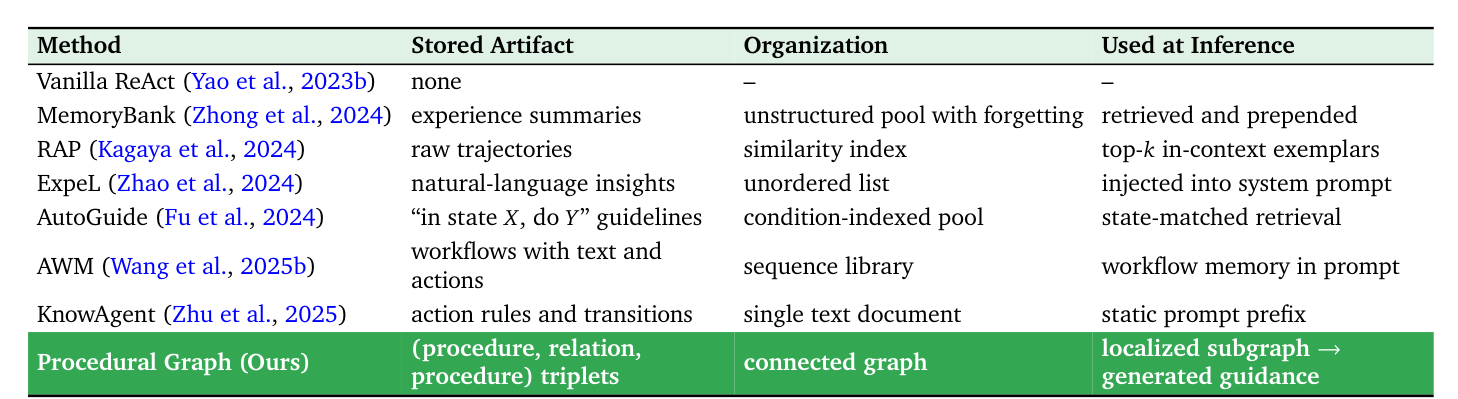
| Method | What it stores | How it is used at inference time |
|---|---|---|
| Vanilla ReAct | Nothing | None; this is the starting point |
| MemoryBank | A summary of experience for each question, with old ones dropped by a forgetting mechanism | Retrieved by relevance (favoring recent ones) and placed at the very front of the prompt |
| RAP | Complete historical trajectories | Finds the few most similar trajectories and puts them in the prompt as examples |
| ExpeL | Natural-language lessons distilled by comparing successful and failed trajectories | The lessons go into the system prompt, with retrieved successful examples attached |
| AutoGuide | Conditional guidance of the form “in state X, do Y”, also extracted by contrasting successes and failures | At each step, first summarize the current state, then retrieve the guidance that matches |
| AWM | Workflows distilled from successful trajectories (a text description plus an action sequence) | The workflows are put into the prompt |
| KnowAgent | The available actions and text rules for “which action can follow which” | The whole thing is put into the prompt as a fixed prefix, identical at every step |
Two are closest to PG:
- AutoGuide: the paper itself says it is the closest (Appendix A.4). It is likewise “situation maps to action” and likewise retrieves at every step. The difference is that AutoGuide’s guidance items are independent of each other, while PG connects them into a graph.
- KnowAgent: the “action transition rules” it stores are, conceptually, PG’s edges, but it is a static piece of text with no graph structure, and it does not take just one piece according to the current position.
If either of these beats PG, it deserves the closest look, because they are closest to what PG claims is new.