SketchVLM: Letting a VLM Draw Its Own Reasoning

1 Introduction
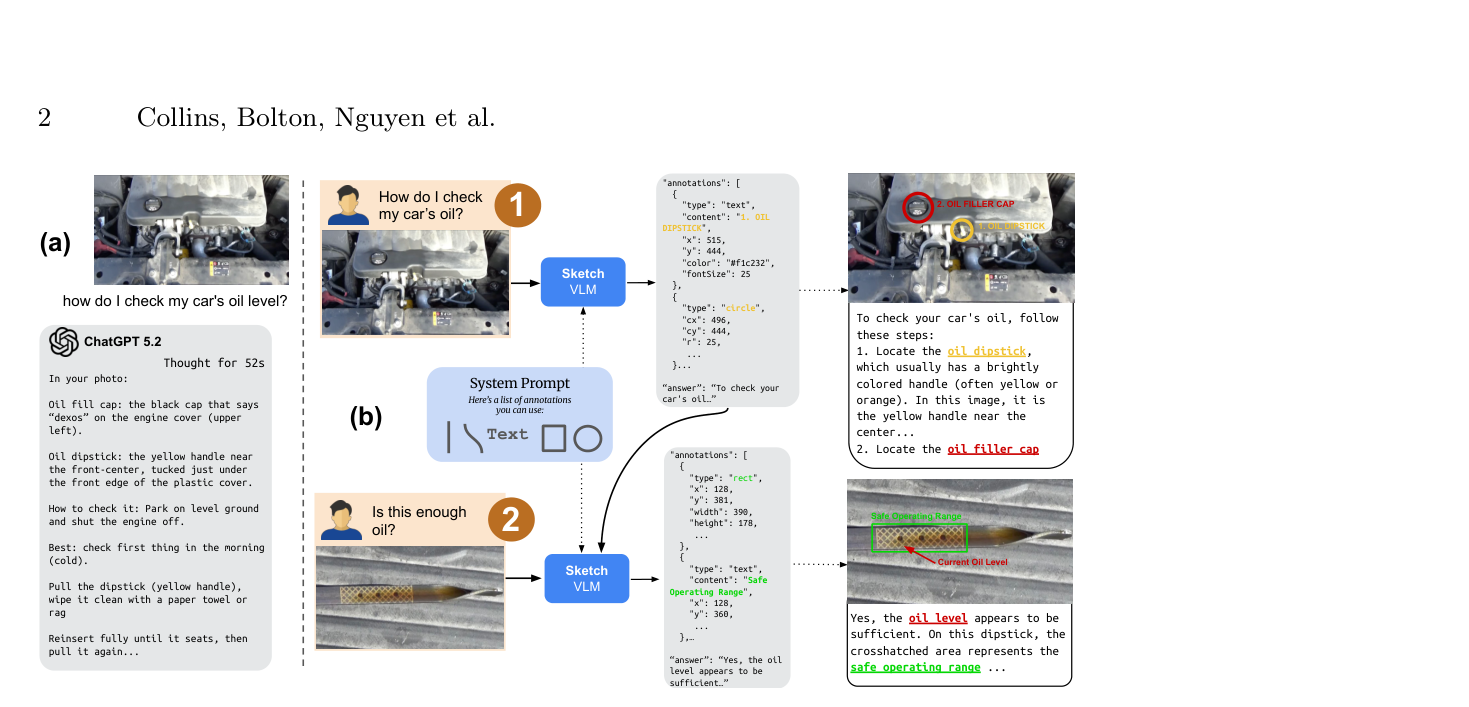
Ask today’s most capable vision language models (VLMs) a visual reasoning question and you will usually get back a wall of text: whether there’s enough engine oil, which bucket the ball will land in, how to get through the maze. The problem is, how do you verify any of it? There is no direct correspondence between the text and the image, the model may simply have guessed at the answer, and you have no way to see what its judgement was based on.
That verification gap is exactly what SketchVLM sets out to close. It lets a VLM answer not only in text but by drawing lines, boxes, and numbers directly onto the original image, laying its thought process out where you can see it — and it does so without retraining the model, and without touching a single pixel of the original image.
This article follows SketchVLM’s technical thread: how it gets the model to draw accurately on the canvas, how it turns drawing into a structured instruction format the model can emit reliably, how it uses mathematics to turn jittery coordinate points into smooth curves, and finally how the framework performs on real tasks — along with the problems it hasn’t solved yet.
- Non-destructive annotation: an SVG vector layer sits on top of the original image, so every original pixel is preserved intact.
- Training-free: model parameters are untouched; visual prompting such as a coordinate grid plus a carefully designed system prompt is enough to give existing VLMs drawing ability.
- Visual chain-of-thought: the reasoning process is drawn out so annotations and the text answer can be checked against each other — annotation–text alignment averages 95.5%, far above the 28.6%–46.8% of fine-tuned models.
2 “How do you know you’re right?” — the VLM verification gap
Top-tier models like GPT-4o and Gemini already generate fluent text, but the moment a task requires spatial reasoning tied precisely to pixel positions, the cracks show. A user asks a question about car maintenance or a physical trajectory, the model returns a long paragraph of description, and that paragraph is very hard to map precisely onto a location in the image. (For just how hard the underlying visual representation problem is for multimodal models, see the earlier walkthrough of Cambrian-1.)
Hallucination makes it worse. The model may produce the right text while having effectively guessed, or may have looked at entirely the wrong place and still landed on a correct answer. Text-only output gives the user no way to work backwards and check the model’s reasoning — you can only choose to believe it or not.
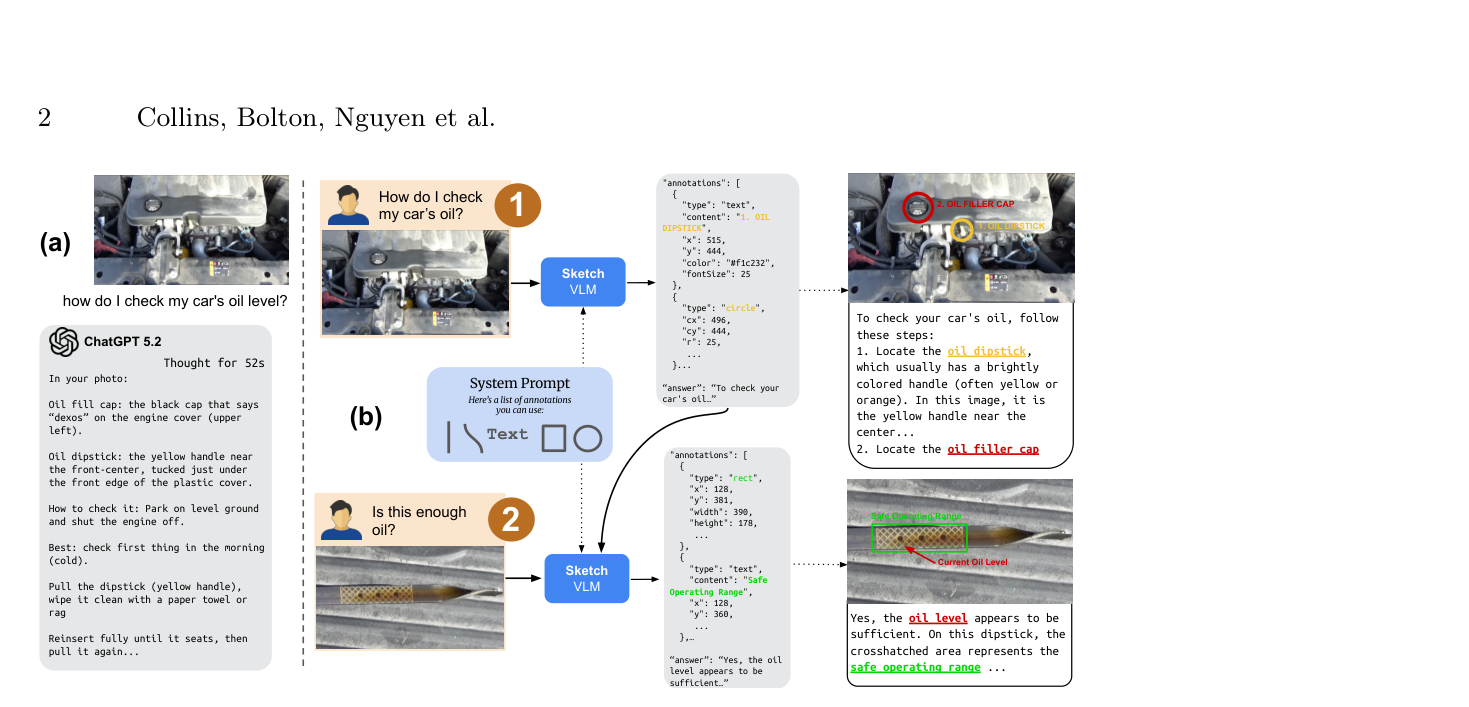
SketchVLM’s approach is to prise open one corner of that black box. Asked the same question about how to read an engine oil dipstick, a conventional VLM hands you a paragraph of explanation; SketchVLM instead marks the safe-level graduations directly on the photo of the dipstick and walks you through them step by step.
3 Existing annotation approaches, and where each one bottoms out
Before SketchVLM, getting a VLM to “point at” what matters in a picture came in roughly three flavours, each with a clear ceiling.
- Coordinate point output (e.g. Molmo, MoonDream): cheap to compute, but it can only give points — no continuous trajectories or shapes — so tasks needing a box or a connecting line are out of reach.
- Image editing (e.g. Nano Banana Pro): visually intuitive, but it modifies the original pixels. That’s destructive, and it readily hallucinates content unrelated to the original image.
- Task-specific fine-tuning (e.g. ViLaSR, ThinkMorph): decent on the tasks it was trained for, but accuracy collapses on an unseen task type such as a new maze layout — generalisation is poor. (On the cost side of fine-tuning multimodal models specifically, see the earlier post on LayerNorm Tuning.)
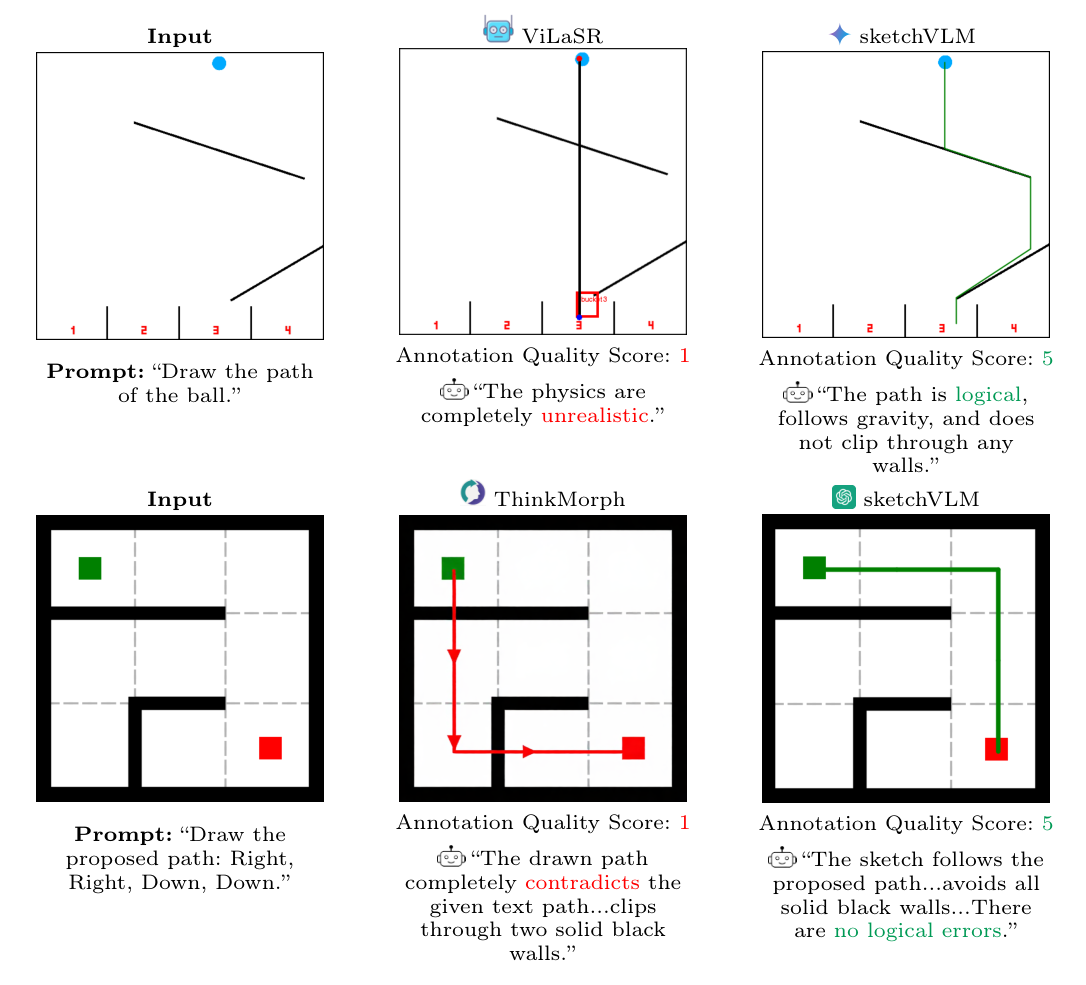
The paper spells out these three shortcomings concretely with a set of examples across ball-drop trajectories, connect-the-dots, and maze navigation: Nano Banana Pro routinely alters the original scene outright and draws trajectories that defy physical intuition, while the fine-tuned models stay reasonably steady on the tasks they were trained for but clearly falter the moment the scene changes.
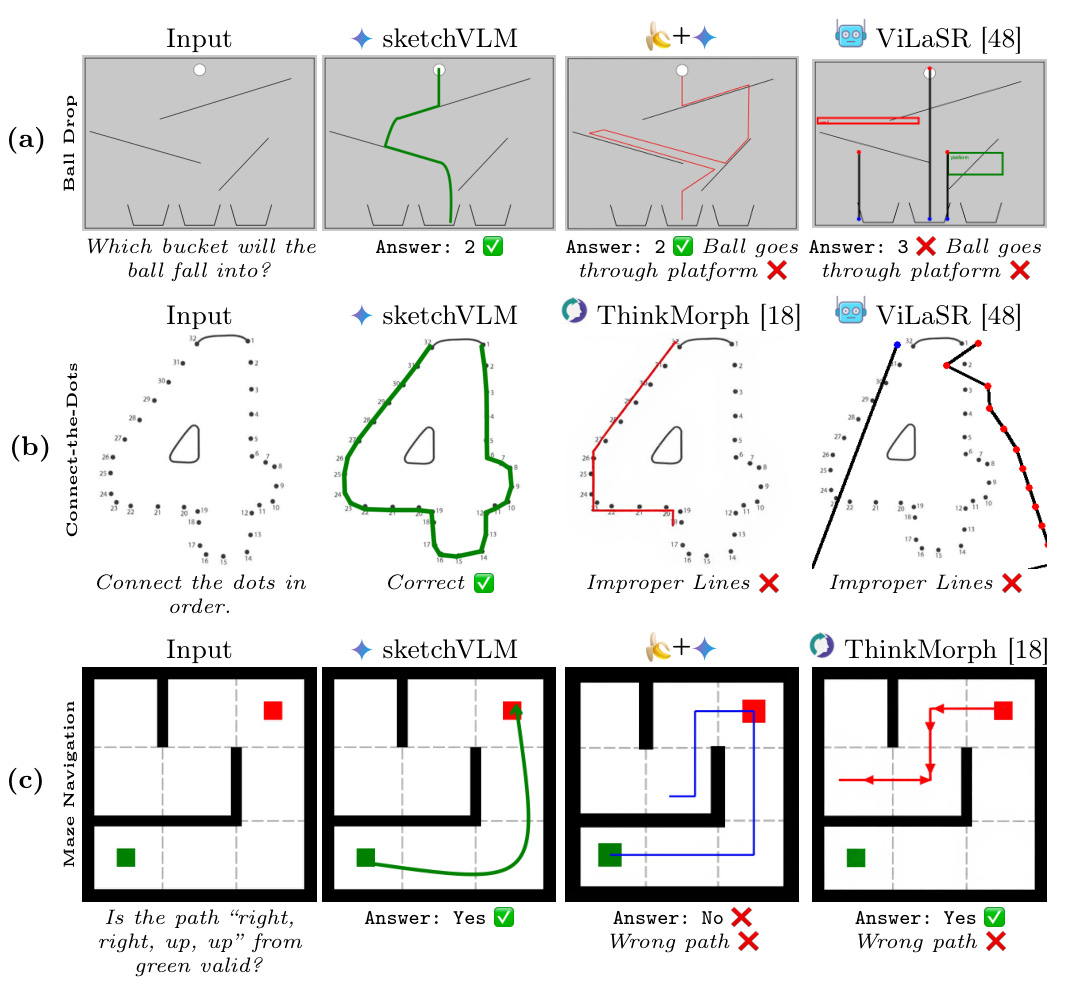
The paper compares these routes systematically, and the crux is which of them manages to be both training-free and a non-destructive vector overlay.
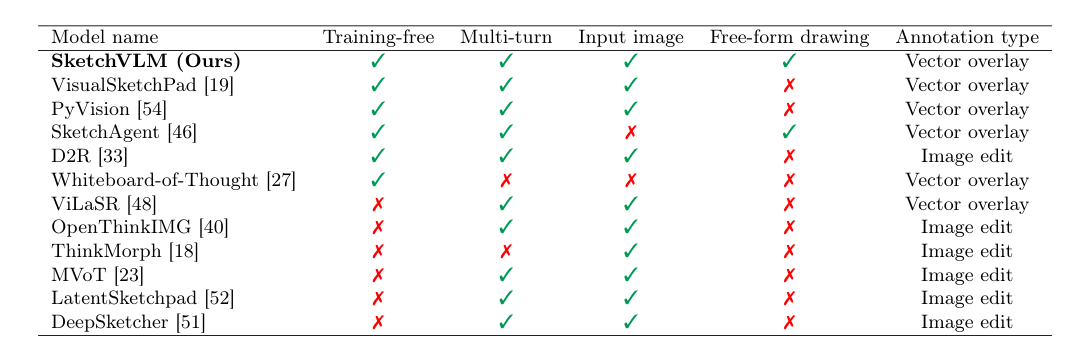
“Non-destructive” sounds like a nice-to-have, but in some settings it is a hard requirement. Picture medical imaging or an industrial repair site: if the annotation process covers up a crack or a component in the original photo, the AI assistant has become actively dangerous. SketchVLM overlays an SVG vector layer, so every pixel of the original image stays 100% intact — the annotation is just a transparency laid on top, which the user can edit or peel off whole at any time.
4 SketchVLM’s three design pillars
Put those problems and constraints side by side and the design goals fall out cleanly, in three parts:
- Non-destructive annotation: an SVG vector layer over the original image, with the source data fully preserved.
- Training-free: the whole framework is model-agnostic and needs no retraining — a carefully designed system prompt is enough to give an existing strong VLM the ability to draw. (Putting the capability in the prompt layer and never touching the weights is the same trade-off SkillOpt makes.)
- Visual chain-of-thought: the model’s reasoning process is drawn out directly, so the annotations and the text answer agree with each other and can be cross-checked.
The next few sections unpack how each of these is actually realised: first how the model draws accurately, then how drawing is turned into stable instruction output, and finally how the jittery lines it produces get smoothed into clean curves.
5 The coordinate grid: hand the model a ruler first
A VLM has no built-in sense of precise coordinates, and asking it to pick out the right position on an image by intuition is not easy. SketchVLM’s move is not to trust that intuition but to hand the model an external “ruler” — a coordinate grid.
In implementation, the system does not draw gridlines onto the original image’s pixels (that would obscure the content). Instead, using an image library such as Pillow, it appends white margins to the left and bottom of the image, marks graduations along those margins, and aligns them with the image resolution — for a 1000x1000 image, the margin ticks run from 0 to 1000. The benefit is that not one pixel of the original image is affected: what the model sees is “the original picture plus a bolted-on ruler”, not a picture chopped up by gridlines.
This is also why the authors call the technique visual prompting rather than mere image preprocessing: it does not touch the model’s parameters at all, it simply changes the image on the input side to induce more regular behaviour. It’s a bit like giving someone with normal eyesight but no sense of direction a map with a grid drawn over it — the gridlines are the prompt that lets them describe a route precisely.
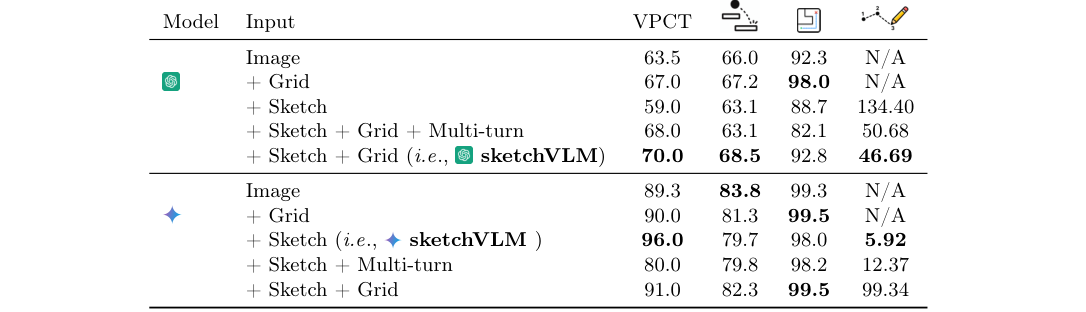
Interestingly, not every model takes to it. The paper’s ablation shows that with the grid added, Gemini-3-Pro’s error on the connect-the-dots task drops sharply; GPT-5, by contrast, is unmoved and even slips slightly. The suspected reason is that the GPT family already has a strong internal normalised coordinate system (0 to 1000), so an extra grid layered on the outside may visually interfere with that built-in sense of coordinates.
6 Turning drawing into structured instructions: XML syntax and coordinate encoding
With an external coordinate system in place, the next question is: how does the model state “I want to draw a line here” clearly, stably, and in a form a program can parse reliably?
SketchVLM drops JSON in favour of XML-style tags. The reason is pragmatic: language models are noticeably more stable at generating paired tags (an opening tag matched by a closing one) than nested JSON structures, and the backend can pull the content out precisely with a simple regular expression instead of handling malformed JSON. Each stroke is wrapped in <sN>...</sN>, where N is the stroke’s index; coordinates use a format like x500y100 that glues x and y together, the point being to compress a coordinate pair into a single token and reduce the chance the model mispairs x with y when emitting them.
On top of this syntax, the model can describe several basic drawing actions:
| Shape type | How it’s expressed | When to use it |
|---|---|---|
| Free-form drawing | A run of consecutive coordinate points | Complex paths, e.g. a bounce trajectory |
| Straight line | Start point and end point only | Pointing, simple lines |
| Rectangle / box | Four corner points in order | Boxing out an object’s extent |
| Arrow | Split into shaft and head | When direction must be explicit |
| Text label | <text> plus an anchor coordinate | Numbers or names; the model picks font size and colour by contrast |
One small trick when drawing rectangles is worth mentioning: at each of the four corners, the system requires the model to emit the same coordinate twice in a row. This is because the points are later joined into arcs with Bezier curves, and without the trick a square’s corners get smoothed into rounded ones; repeating a coordinate at the same point effectively tells the smoothing algorithm to “pause here”, preserving the sharp angle. It’s a neat example of solving a geometric rendering problem through instruction design.
Besides coordinates, the model must attach a value to each point, ranging from 0 to 1, representing how far through the stroke that point falls. The parameter itself does not affect coordinate positions, but the downstream Bezier smoothing algorithm needs it to work out each point’s ordering and tangent direction — without , the algorithm cannot tell how these points should be strung into a smooth, directed curve.
The authors also design task-specific instruction constraints: object counting may only place a number at the centre point and may not draw boxes; part labelling is forced to use a predefined label list so the model cannot invent names; and maze navigation requires the model to “draw first, answer second”, making the annotation the model’s own scratchpad that supports step-by-step reasoning rather than a post-hoc explanation.
7 From jittery points to smooth lines: Bezier curves and least squares
The coordinate points a VLM outputs are usually discrete and slightly jittery; joining them with straight segments produces something visibly jagged, nothing like a hand-drawn line. This section is about how SketchVLM turns “imperfect points” into “curves that look right”.
The cubic Bezier curve is the core tool here. What makes it special is that you don’t have to describe every point on the line — four control points suffice to define a smooth curve. Two of them are the endpoints and , which the line is guaranteed to pass through; the other two, and , do not lie on the line and behave more like magnets — sets the direction in which the line leaves the start point, the direction in which it enters the end point, each pulling the curve’s overall path towards itself.
The problem is that the VLM gives you points along the path, whereas a Bezier curve needs control points (magnets) — two different things, so a bridge is required, and this is where least squares comes in. The procedure collects the run of coordinate points the model emitted along with their values, posits a Bezier curve, computes the sum of squared distances between that curve and those points, and then uses calculus to find the and coordinates that minimise the error. Put plainly, least squares acts as a translator: it converts the jittery run of path points the model tossed out into the two magnet positions that mathematically fit those points best.
Take predicting a physical drop trajectory: the model only needs to output three key points from the ball’s bounce, and least squares fills in the arc the parabola should have, making the trajectory look physically plausible. There’s a side benefit for engineering, too: because only a handful of key points are needed to describe a complex shape, the model’s XML output gets shorter, response times improve, and API costs fall along with them.
8 Making annotations both legible and instructive
Once the drawing is accurate and stable, two practical questions remain: how do these annotations stay clearly visible against any background? And when a task calls for guiding the user step by step, how does the model keep multi-turn dialogue coherent?
8.1 Visibility: model-side decisions plus render-side protection
For visibility, SketchVLM uses a dual mechanism of “the model decides, the renderer protects”. On colour, the model analyses the image’s background and specifies a sufficiently high-contrast colour code directly in the XML. On size, text labels and line weights scale dynamically with the object’s proportion of the frame. At render time, text is uniformly given a contrasting outline (much like the black stroke common in game subtitles), ensuring annotations don’t smear into a complex background.
8.2 Single-turn versus multi-turn: the trade-off
As for dialogue, SketchVLM supports both single-turn and multi-turn modes, which suit rather different scenarios:
| Property | Single-turn | Multi-turn |
|---|---|---|
| Behaviour | Emits all annotations and the answer at once | Draws one stroke, says one thing, waits for feedback |
| Best for | Quick diagnosis, physical trajectory prediction | Software walkthroughs, complex repair guides |
| System cost | Low, a single API call | High, repeated image upload and processing |
It’s worth noting that single-turn mode’s accuracy holds up too. That reflects the fact that a model like today’s Gemini 3 Pro can fully simulate an entire physical trajectory or solution process internally even without drawing as it thinks, effectively compressing multi-turn reasoning into a single pass — a kind of built-in “internal mental simulation” capability.
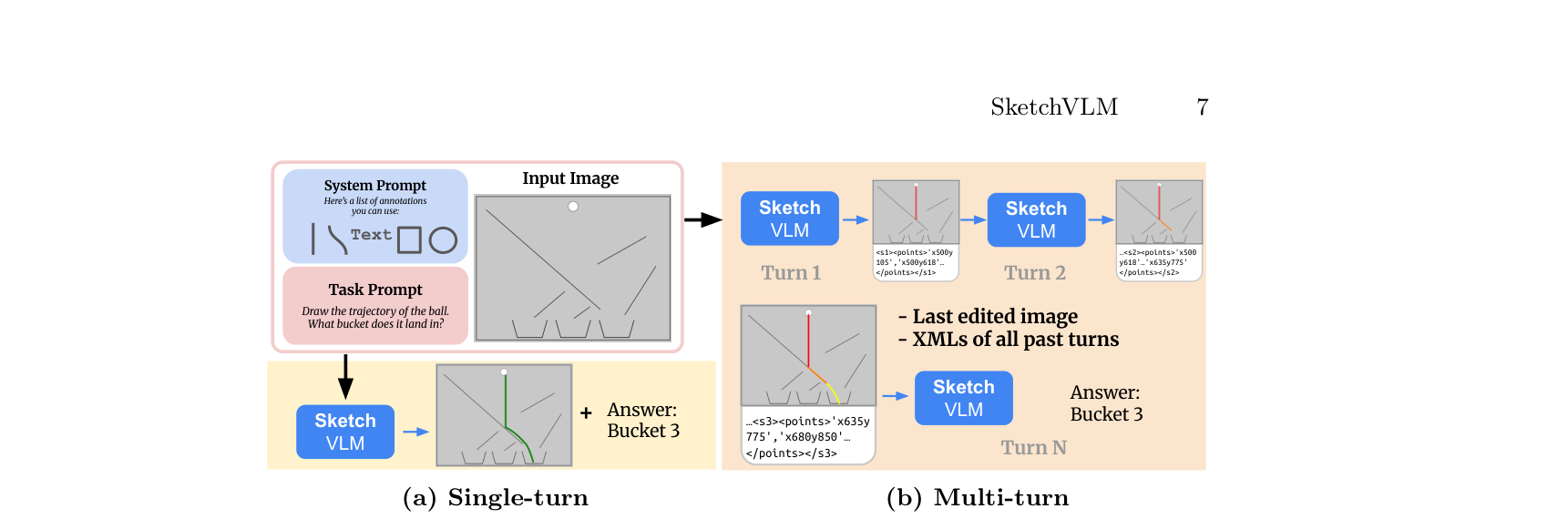
Multi-turn mode has an easily overlooked detail: on each turn, besides the image drawn so far, the model must also receive the XML text record of every previous annotation. The reason is that from the rendered picture alone the model struggles to identify the exact pixel coordinates at a line’s end, so the next stroke easily fails to connect; the text record supplies precise numeric memory while the image supplies spatial sense, and only together do they keep multi-turn annotation coherent. The authors also add a “one stroke per turn” gating rule, forcing the model to draw a single stroke each turn and breaking a complex operation into steps the user can absorb — particularly useful in a teaching context, since the frame never fills up with annotations all at once.
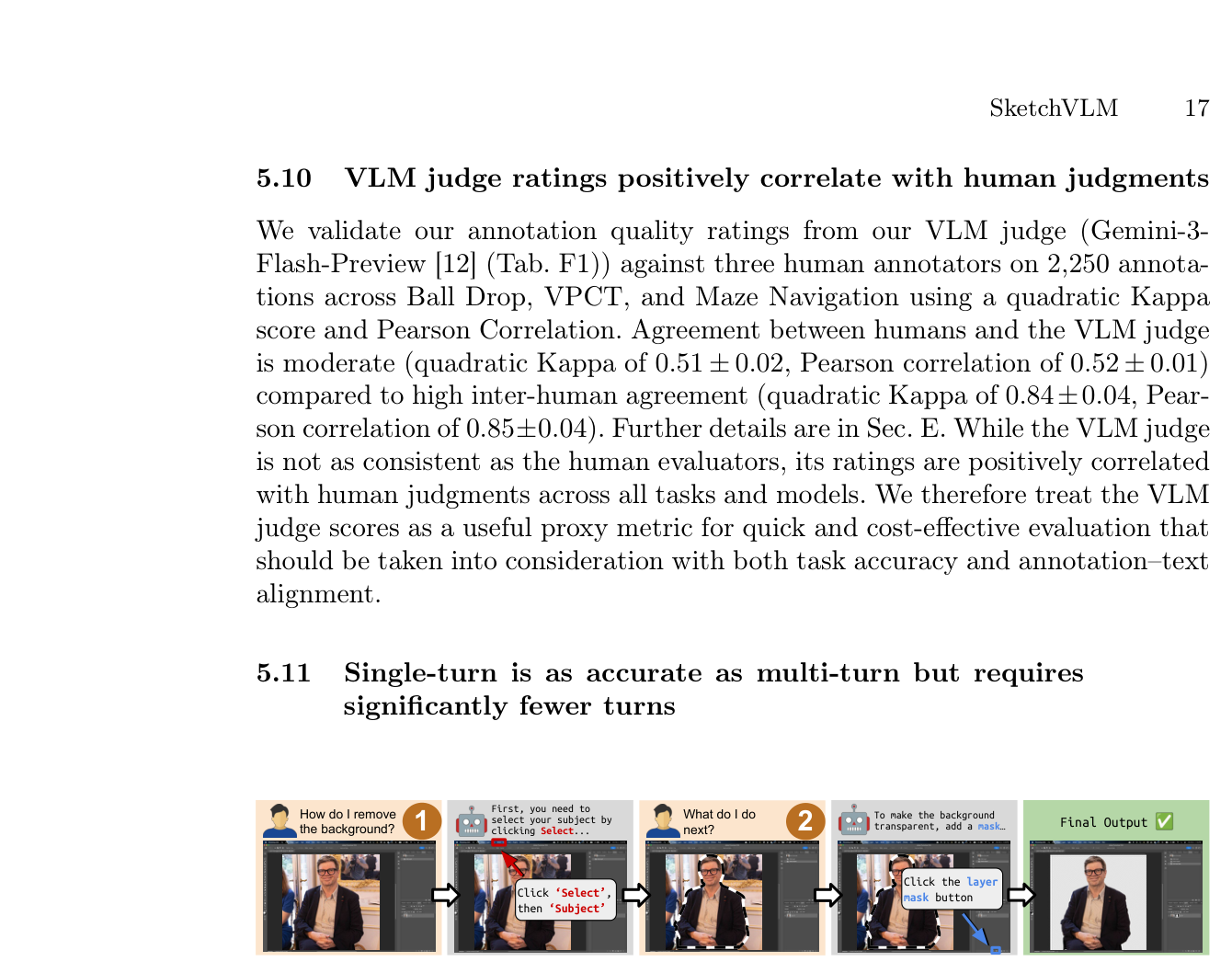
The paper demonstrates a couple of real scenarios: one guides a user through removing a background in Photoshop, with the model receiving the current screenshot each turn and using labelled arrows and highlight boxes to indicate where to click next; the other walks through setting up a cloud instance in the AWS console, where the model uses the same multi-turn annotation approach to point out where to click on a button-dense, complex interface. Both examples show how much the “one stroke per turn plus text history” combination matters for genuinely complex operational tutorials.
9 Experimental results: seven tasks, three metrics
The paper evaluates SketchVLM on seven tasks: connect-the-dots, object counting, drawing shapes, part labelling, maze navigation, physical intuition (predicting which container a ball lands in), and advanced physics (simulating drop and bounce trajectories). The range is wide, spanning pure spatial precision through to path reasoning that requires planning.
Evaluation goes beyond whether the final answer is right. The authors define three dimensions: the accuracy of the answer itself, whether the annotation is smooth and well-formed (annotation quality), and “annotation–text alignment” — that is, whether looking at the annotations alone, without the text answer, lets you infer the model’s conclusion. The authors stress that the third metric matters most, because it verifies whether the annotation genuinely reflects the model’s thinking rather than being decoration that merely looks good.
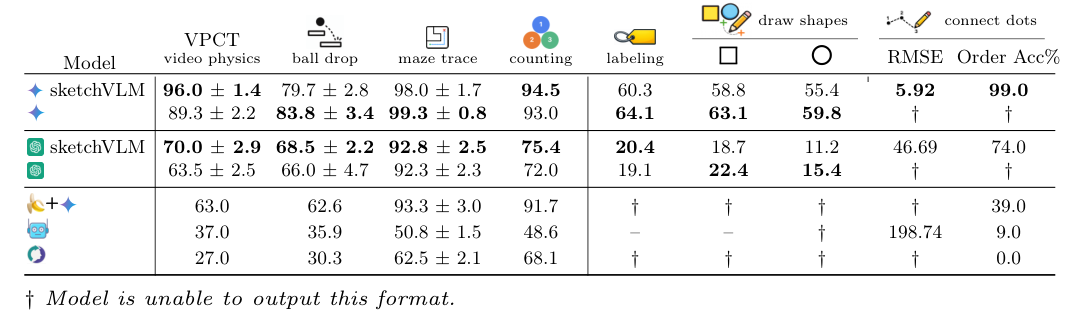
On the numbers, SketchVLM beats image-editing baselines (such as Nano Banana Pro) on reasoning accuracy by up to 28.5 percentage points; annotation quality is roughly 1.48x better than fine-tuned models (ViLaSR, ThinkMorph); and annotation–text alignment averages 95.5%, far above those models’ 28.6% to 46.8%.
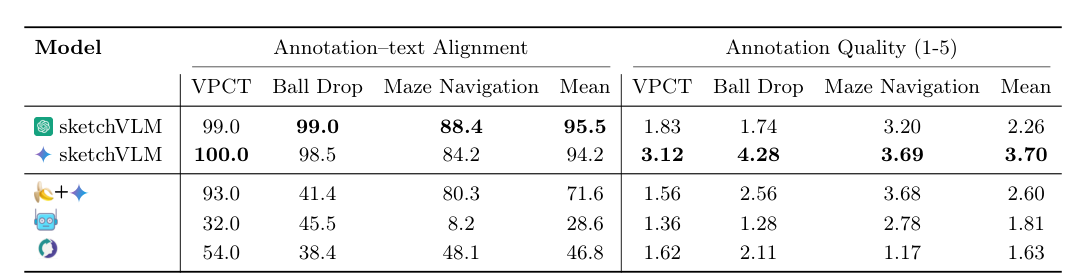
The “annotation–text alignment” metric is more abstract, and the paper grounds why it matters with a concrete case: fine-tuned models like ThinkMorph and ViLaSR sometimes produce annotations of poor quality with clear logical errors, yet still land on the correct final text answer. This “right answer, messy process” pattern leaves users with no way to verify the model’s reasoning through its annotations — a sharp contrast with SketchVLM, whose annotations and answer echo each other in high-quality output.
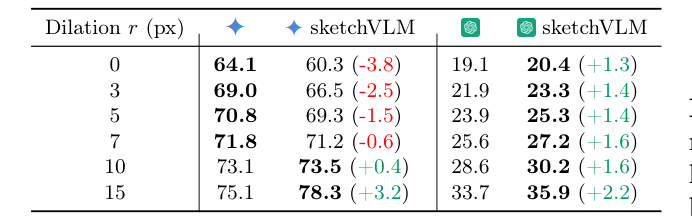
The part-labelling task yields one more detail worth noting: the label positions SketchVLM places land very close to the correct locations, beating the baseline at every error tolerance, with the gap down to just a few pixels.
10 Limitations and open problems
SketchVLM does well, but the authors flag several real limitations themselves:
- Small objects are a challenge: the paper makes the honest finding that for very small objects, SketchVLM’s annotation precision is slightly worse than simply outputting a coordinate box — related to VLMs being inherently less sensitive to small pixel regions.
- Interaction is still incomplete: multi-turn dialogue currently has no “undo” or “erase”; if the model draws something wrong, it cannot make a local correction the way a real whiteboard discussion would, and can only keep drawing.
- Only static images are supported: the annotation mechanism has not yet been extended to video.
All three read as clear directions for future work rather than fundamental design flaws.
11 Conclusion
The core problem SketchVLM tackles is simple: VLMs are increasingly articulate, but what they say cannot be verified. Its answer comes down to three things. First, least squares fits Bezier curves to the model’s jittery coordinate output, converting fuzzy visual perception into precise geometric lines — the mathematical basis for drawing smooth curves from a handful of coordinate points. Second, XML tags and the coordinate grid establish a “visual thinking language” that the model can emit stably and the backend can parse reliably, with no retraining whatsoever. Third, insisting on an SVG vector overlay rather than pixel modification keeps the original image’s integrity intact.
Across all three metrics — accuracy, annotation quality, and annotation–text alignment — SketchVLM clearly surpasses existing image-editing and fine-tuning methods. Its weak spots are annotation precision on very small objects and the missing interaction details such as undo and erase. Taken as a whole, this is solid work that turns “let the model draw to explain itself” from a concept into a practical, training-free, non-destructive framework.