Boolean Operators in Python: and, or, not


1 Introduction
This is the fifth article in the Python programming beginner’s series. In the previous one, “Your First Python Program”, we wrote a program that interacts with the user: the program asks a question, the user types an answer. But that interaction is still thin, because whatever the user types, the program does exactly the same thing.
To get a program to “act on the circumstances”, the first step isn’t rushing to learn how to write if — it’s understanding how a program expresses “yes” and “no”. Starting from the concept of flow control, this article introduces the boolean data type, comparison operators, and the three boolean operators and, or and not.
2 Flow Control in Programs
“Having a program take different actions depending on the situation (the input)” is what’s called flow control. The concept isn’t unfamiliar at all — we do it every day in ordinary life, we just don’t draw it out.
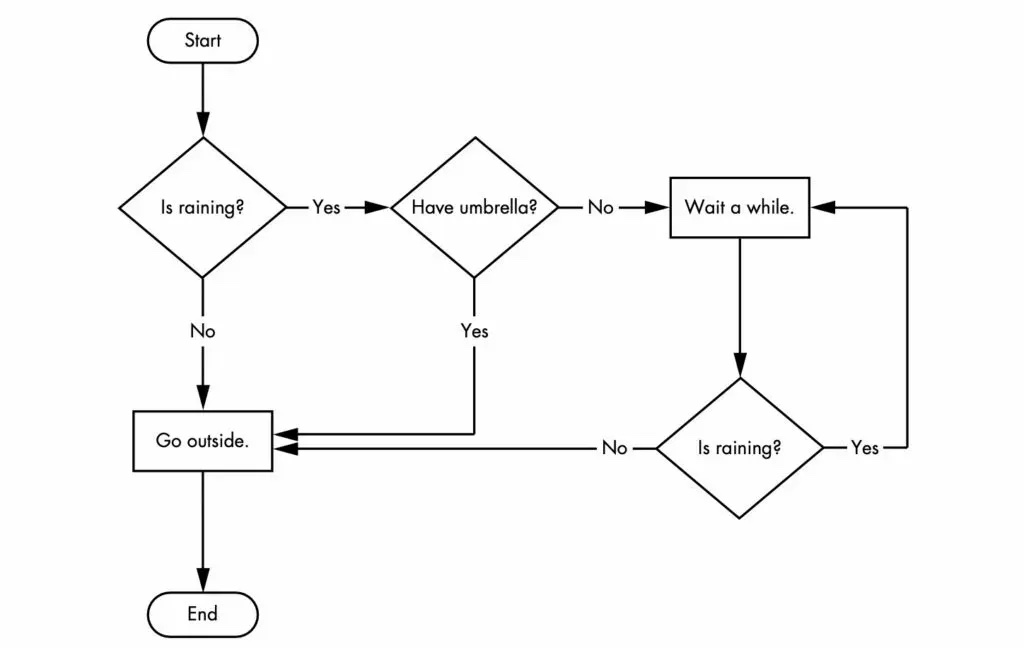
We set out from “Start” and first meet the check “Is raining?” — “Yes” leads to “Have umbrella?”, “No” leads to “Go outside.” “Have umbrella?” works the same way: “Yes” leads to “Go outside.”, “No” leads to “Wait a while.”
The key is those diamond-shaped decision nodes. Because the flowchart contains the two checks “Is raining?” and “Have umbrella?”, there’s no longer just one path from “Start” to “End” — there are several different ways through.
Write that same idea into a program and it can take different actions in different situations. To write such a check, though, we first need to know how to express the “Yes” and “No” inside those diamonds in a program.
3 The Boolean Data Type
“Is raining?” in the flowchart has only two possible outcomes — either “Yes” or “No”. There’s no third answer.
Most common programming languages have a data type that corresponds exactly to this black-or-white situation: the boolean. A boolean value has only two possibilities: True and False. “True” stands for “Yes”, “False” stands for “No”.
So far we’ve met four data types: integer, floating-point, string and boolean. The first three were introduced in “Variables and Data Types in Python”.
Creating a boolean variable in Python is straightforward — just set the variable’s value to True or False. Note that the first letter of True and False must be capitalised; these are Python keywords, and writing true raises an error outright.
x = True
y = False
4 Comparison Operators
Next up are comparison operators. Comparisons common in everyday life include “equal to”, “not equal to”, “greater than”, “less than”, “greater than or equal to” and “less than or equal to” — all familiar from maths class.
Their equivalents in Python are shown below:
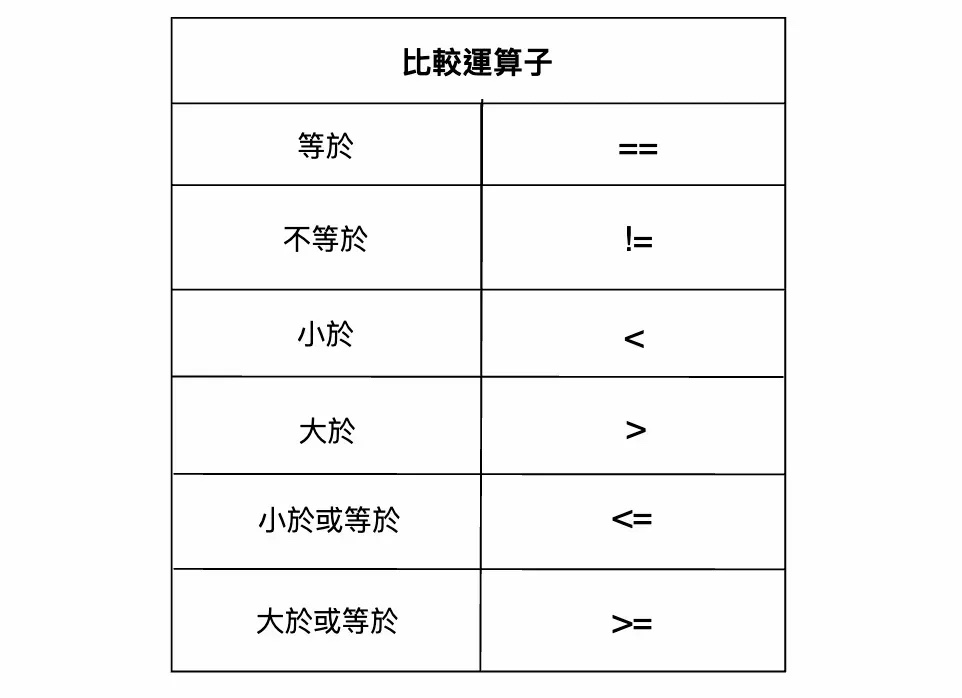
A comparison operator takes two values and returns a result, and that result is either True or False. In other words, what a comparison operator returns is precisely a boolean — which is exactly why it connects up with flow control. We can write and run the following code in Colab.
1 == 2

10 <= 20

20-1 != 19

'apple' == 'apple'
You’ll find that every result is either True or False. Strings can be compared too: 'apple' == 'apple' asks “do these two strings look the same?”, and the answer is True.
5 == vs. =
In the comparison operators above, checking whether two values are the same uses two equals signs (==). This is where beginners trip up most often, so never confuse == with =:
==: asks whether two values are the same=: assigns the value on the right into the variable on the left
That is, x = 3 is the action “store 3 in x”, and running it does not produce True or False; x == 3 is the question “is x currently 3?”, and running it produces a boolean.
Here’s an easy way to remember it: both “ask whether two values are the same” and “ask whether two values differ” use two characters — == and !=. Whenever you’re asking a question, the operator is two characters long.
6 Boolean Operators
With comparison operators covered, next come boolean operators. Think of an “operator” as an operation you can perform on a particular data type — for integers and floats, the operators include +, -, *, /, % and //.
There are three boolean operators: and, or and not. A boolean operator takes boolean values and returns a boolean value. Let’s go through what each of the three means.
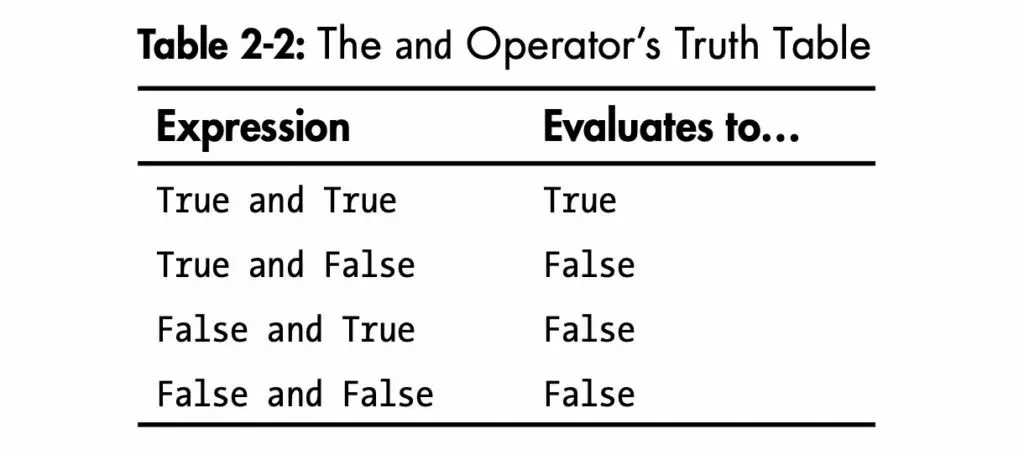
- and: if both boolean values are True, it returns True; if either is False, it returns False. Run the following Python code to get a feel for
and.
True and True

True and False

False and False
Below is the truth table for “and”, listing every possible combination of inputs and its corresponding result. A truth table is the quickest way to understand a logical operation — nothing to memorise, just read it off:
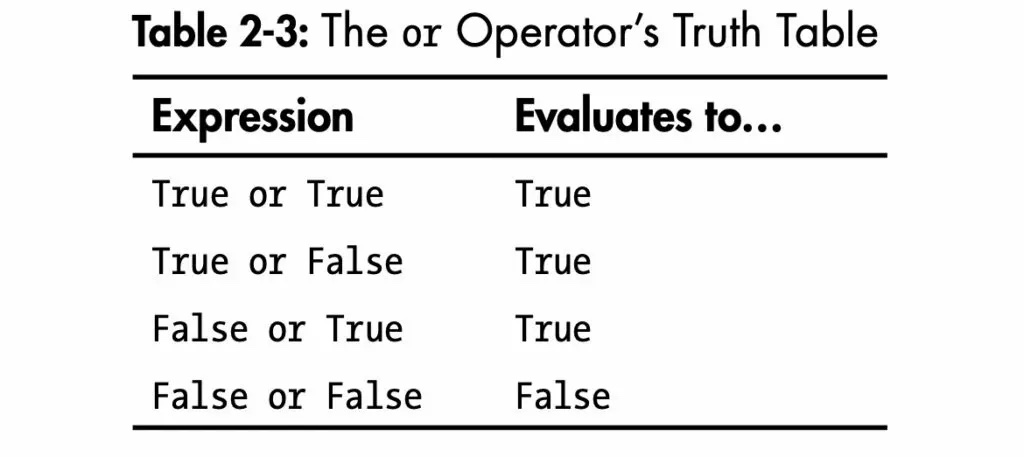
- or: if either boolean value is True, it returns True; if both are False, it returns False. Run the following Python code to get a feel for
or.
True or True

True or False

False or False
Below is the truth table for or, listing every case:
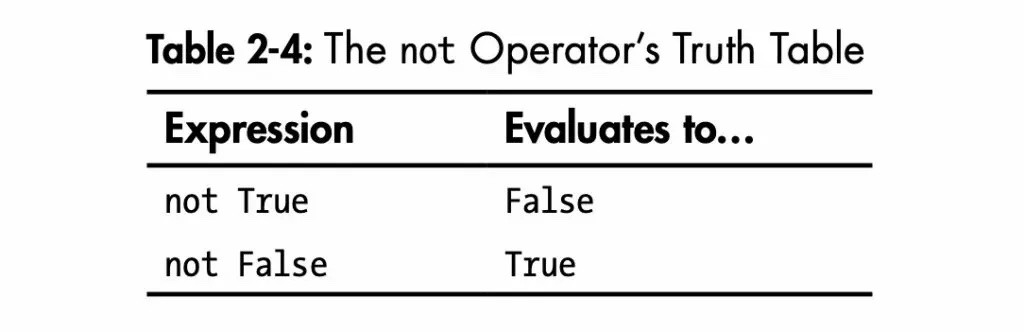
- not: unlike
andandor,nottakes only one boolean value and returns its opposite. For example, try running the following Python code:
not True

not False
Below is the truth table for not, listing every case:
7 Combining Comparison and Boolean Operators
As mentioned earlier, running a comparison operator produces a boolean value. Since boolean operators consume boolean values, the two naturally chain together: use boolean operators to combine several comparison operators, and the end result is still just a single boolean.
Back to the flowchart: a check like “it’s raining and I have an umbrella”, which contains two conditions at once, is written in code exactly as this kind of combination.
For example, run the following Python code:
(2 ==3) and (5 == 6)

(2 < 3) or (5 > 6)

(2 != 3) or (5 <= 6)

not ((2 != 3) or (10 <= 6))
Take the last example. As shown below, the program works from the innermost parentheses outward: first (2 != 3) gives True, then (10 <= 6) gives False, then or-ing the two together gives True, and finally the outermost not gives False.
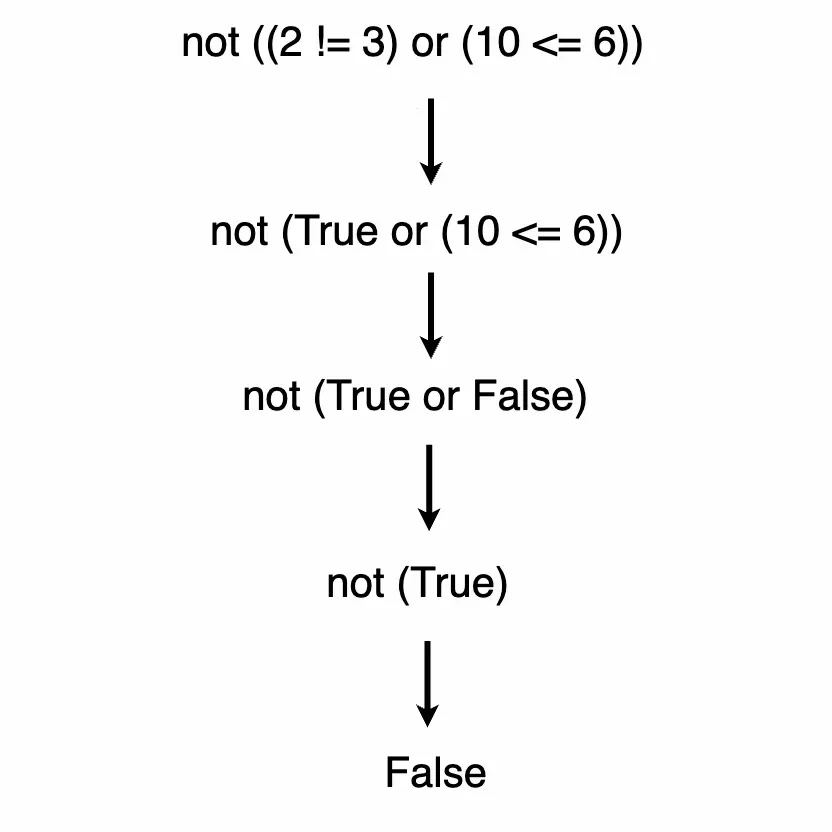
Follow the “inside out, one layer at a time, replacing with booleans” order and even a very long condition comes apart.
8 Conclusion
This article introduced the boolean data type and two related families of operators: comparison operators that return booleans (==, !=, >, < and so on), and boolean operators that combine booleans (and, or, not). Paired with truth tables, that’s enough to work out the result of any boolean expression.
Booleans are the most basic element of flow control — without them there’s no “condition” to speak of. The next article covers how to write flow control statements in Python: if, elif and else.