Arithmetic in Python: Understanding Expressions

1 Introduction
This is the second article in the Python programming beginner’s series. In the previous one we got the environment ready; in this one we actually start writing Python code, beginning with the arithmetic everyone already knows — turning maths into something a computer understands.
Besides the four basic operations, this article also introduces the idea of an expression. It sounds academic, but it’s just the “sum” you’ve been writing since primary school, restated in programming terms. Once it clicks, variables and conditionals later on go down much more smoothly.
2 Opening and Naming a Colab
In the previous article we introduced Google Colaboratory (Colab), a handy online editor. It runs in the browser, so there’s no need to install Python on your own machine — the lowest-friction starting point there is for a beginner.
Before writing any Python code, create a new Colab file in your Drive and give it a recognisable name. Every piece of code from here on gets written and run inside a Colab cell.
3 Basic Arithmetic
Let’s start with the simplest possible program: what is 123 + 456? A calculator answers that in a second, and in Python the code looks almost exactly like the maths:
123 + 456Run that line in a Colab cell and you see the answer straight away. By the same token, if we want to work out 907 - 456, you can certainly write the program immediately:
907 - 456For multiplication and division, note that the symbols differ from your maths textbook: multiplication uses an asterisk * and division a forward slash /, not x and ÷. Here we compute 1445 x 404 and 1309 ÷ 56:
1445 * 404
1309 / 56
If you can write all of the above, you’ve already learned how to do arithmetic in Python.
4 Understanding Expressions
Now let’s look at the concept of an expression. In fact, those lines of code we just wrote are expressions.
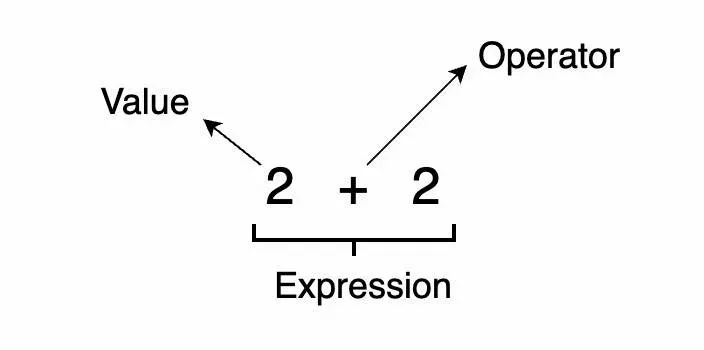
As the figure shows, an expression is made up of two kinds of thing: values and operators. Put more plainly, an expression is a mathematical “sum”, containing a number of “values” and “operator symbols”.
What characterises an expression is that it can be evaluated — a long “sum” can be reduced to a single “value”. For instance, 2 + 2 + 2 + 2 + 2 + 2 is an expression that evaluates to 12. So what the earlier code is doing is writing down one line of expression and handing it to the computer to evaluate:
123 + 456One thing to watch: while evaluating, the computer follows the rules “multiplication and division before addition and subtraction” and “whatever is inside the parentheses first”. That means 1 + 2 * 3 gives 7, not 9; if you really want the addition first, you have to add the parentheses yourself and write (1 + 2) * 3. Keep operator precedence in mind when writing expressions, or you’ll get an answer you didn’t expect.
5 More Advanced Operators: **, % and //
Beyond the basic four operations, Python has three somewhat more advanced operators. First is **, meaning “to the power of”. For example, run the following code to compute “2 to the power of 3”:
2 ** 3% means “remainder”. For example, 15 ÷ 4 = 3 (quotient 3) ⋯ 3 (remainder 3). If we want the remainder of 15 divided by 4 in a program, we use %:
15 % 4Finally, // means “quotient”. Taking 15 ÷ 4 again, if we want the quotient of 15 divided by 4 in a program, we use //:
15 // 4Here’s a point that’s easy to mix up: / produces the ordinary division result, while // keeps only the integer part. The two look one slash apart, but their purposes are entirely different.
6 Syntax Errors
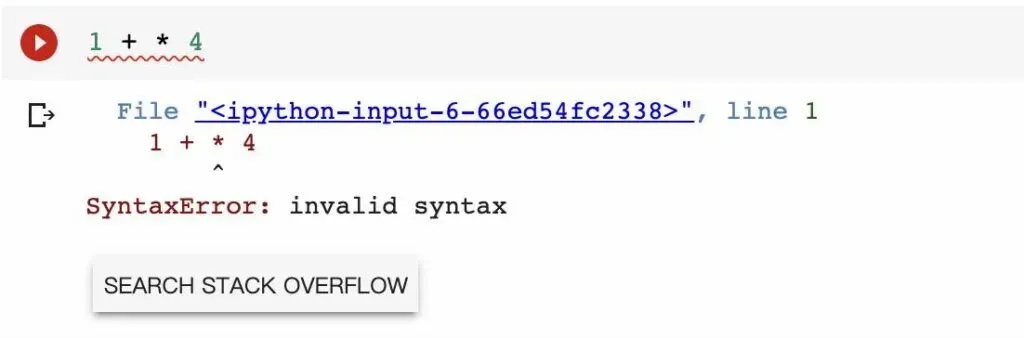
“Syntax Error” is an error message you’ll see often while programming. It means exactly what it says — the computer is telling us there’s something wrong with the syntax of the code you wrote. In the figure above, we originally meant to compute:
1 + 3 * 4but the 3 got left out, making it:
1 + * 4A multiplication sign immediately following a plus sign can’t be evaluated, of course, so the computer displayed a SyntaxError. Don’t panic when you see this message — it usually means a character was missed or typed twice somewhere, and re-reading that line will find it.
One more note: while writing code, we often put “spaces” between numbers and symbols. Those spaces don’t cause a syntax error; they’re purely there to make the code look tidier and cleaner.
7 Conclusion
In this article we learned Python’s most basic syntax and the concept of an expression, and implemented a variety of mathematical operations in Python code — the four basic operations plus the three more advanced operators **, % and //. Along the way we also got to know what the SyntaxError that beginners hit most often actually is.
In the next article we’ll introduce the concept of a “variable” in programming, so we can store a computed result and reuse it instead of rewriting the sum every time.