Loops in Python: while, for, and range()


1 Introduction
The previous article, “if, elif and else in Python”, covered flow control: using if, elif and else to add “conditional checks” to a program, then running the corresponding code based on the result. This article pushes the idea of a “condition” one step further, to another thing you’ll use every single day in programming: the loop.
By the end you’ll know what a loop actually repeats, which situations Python’s while and for forms each suit, how break and continue change a loop’s flow, and how to use range()’s three arguments.
2 What Is a Loop?
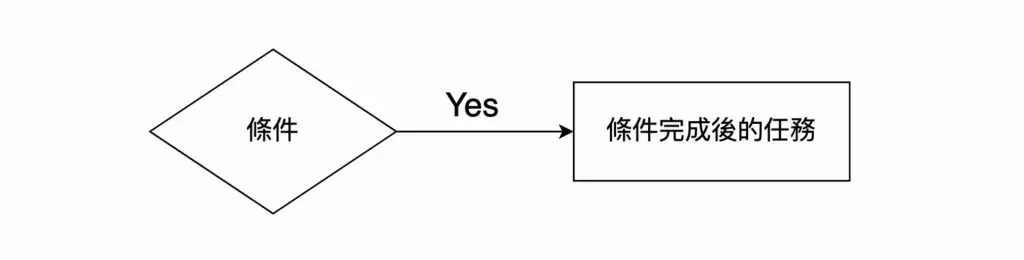
The figure above appeared in the previous article. So-called “flow control” is made up of a “condition” and the “task” to run when that condition holds. When the computer runs this code, it first evaluates the condition, runs the corresponding code based on the result, and then the whole program ends.
But what if we want the computer to evaluate the condition “repeatedly”? As shown below, after running the corresponding code the program doesn’t end — it goes back to the condition check “again”, forming a loop that circles back.
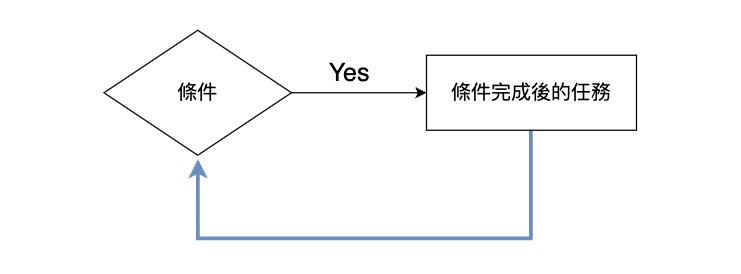
Did you notice? “Repeatedly”, “again”, or “one more time” is exactly what a loop means. Loops are extremely common in the world of programming — any time we want to “repeatedly run a piece of code while some condition holds”, we implement it with a loop.
3 Loop Syntax in Python
In Python, as in most programming languages, loop syntax is generally implemented through two keywords: while and for. Loops written with these two keywords are called a “while loop” and a “for loop”.
for→ for loopwhile→ while loop
Of these, the while loop matches the description of loops given above: keep running as long as the condition holds. So let’s start with while loop syntax.
4 while Loops in Python
Let’s look directly at the following code:
num = 0

while num < 3:
    print('number: ' + str(num))
    num = num + 1
In this code we use the while keyword, followed by a condition and a colon, with the code to run when the condition is met written on a new line and indented. That indentation isn’t just for pretty formatting — Python relies on it to determine which lines belong inside the loop.
Below is this program’s output. You can see that the code inside the loop ran a total of three times.
number: 0
number: 1
number: 2
There’s a crucial ordering here: the condition is confirmed to hold “first”, and the code inside the loop runs “after”. Laying out the execution flow of the program above makes this clearer:
- Loop 1
- Evaluate the condition num < 3. Since num is 0 at this point, the condition holds.
- Run the code inside the loop. “number: 0” is displayed, and num is incremented by 1, becoming 1.
- Loop 2
- Evaluate the condition num < 3. Since num is 1 at this point, the condition holds.
- Run the code inside the loop. “number: 1” is displayed, and num is incremented by 1, becoming 2.
- Loop 3
- Evaluate the condition num < 3. Since num is 2 at this point, the condition holds.
- Run the code inside the loop. “number: 2” is displayed, and num is incremented by 1, becoming 3.
- Loop 4
- Evaluate the condition num < 3. Since num is 3 at this point, the condition does not hold.
From this execution flow we can clearly observe that the “loop condition” was evaluated 4 times, while the “code inside the loop” ran only 3 times. That one extra condition evaluation is what decides whether to leave the loop.
Incidentally, this is also why you must not forget to write the line num = num + 1. Without it, num stays 0 forever, the condition always holds, and the program gets stuck in an infinite loop that never stops.
Let’s look at another example to get comfortable with writing while loops. The code below uses a while loop to compute the sum from 1 to 100:
sum = 0
num = 1

while num <= 100:
    sum += num
    num += 1

print(f'sum: {sum}')
Below is the program’s actual execution flow:
- Loop 1
- Evaluate the loop condition “num <= 100”. num is 1 at this point, so the condition holds.
- Run the loop code “sum += num”, equivalent to “sum = sum + num”. At this point sum is 1 and num is 2.
- Loop 2
- Evaluate the loop condition “num <= 100”. num is 2 at this point, so the condition holds.
- Run the loop code “sum += num”, equivalent to “sum = sum + num”. At this point sum is 1 + 2 and num is 3.
- Loop 3
- Evaluate the loop condition “num <= 100”. num is 3 at this point, so the condition holds.
- Run the loop code “sum += num”, equivalent to “sum = sum + num”. At this point sum is 1 + 2 + 3 and num is 4.
- Loop 4
- Evaluate the loop condition “num <= 100”. num is 4 at this point, so the condition holds.
- Run the loop code “sum += num”, equivalent to “sum = sum + num”. At this point sum is 1 + 2 + 3 + 4 and num is 5.
…
- Loop 100
- Evaluate the loop condition “num <= 100”. num is 100 at this point, so the condition holds.
- Run the loop code “sum += num”, equivalent to “sum = sum + num”. At this point sum is 1 + 2 + 3 + 4 + … + 100 and num is 101.
- Loop 101
- Evaluate the loop condition “num <= 100”. num is 101 at this point, so the condition does not hold.
From this we can clearly observe the while loop’s process of summing from 1 to 100.
The print() function on the last line is also worth expanding on. Besides joining strings and variables together with “string addition”, you can also use an f-string to insert variables directly into a string:
# String addition:
print('sum: ' + str(sum))

# f string
print(f'sum: {sum}')
To use an f-string, put an f in front of the string and wrap the variable in {} wherever you want it inserted. When there are many variables, an f-string reads far better than chaining + all the way through, and it saves you the trouble of calling str() to convert types.
5 break and continue
Whenever loops come up, break and continue are bound to be mentioned. What they have in common is that both interrupt the loop’s normal rhythm; the difference is that one walks out entirely while the other skips just this round.
- break: leave the loop immediately
Once a loop’s condition holds, the computer runs the code inside the loop. We can add break inside the loop, and when the computer reaches that line it leaves the loop immediately.
sum = 0
num = 1

while num <= 100:
    sum += num
    num += 1
    break

print(f'sum: {sum}')
In the code above, the final sum will be 1, because the first time the computer enters the loop it hits break and leaves right away. Writing break directly inside the loop like this robs the loop of any point in “repeating”. In practice we usually pair it with an if check, so that break only fires when a condition is met.
sum = 0
num = 1

while num <= 100:
    sum += num
    num += 1

    if sum > 1000:
        break

print(f'sum: {sum}')
In the code above, we only run break if “sum > 1000”.
- continue: go straight back to the loop condition
Also written inside the loop, continue instead skips the rest of this round and goes straight back to re-evaluating the loop’s condition.
sum = 0
num = 1

while num <= 100:
    sum += num
    num += 1
    print(f'sum: {sum}')
In the code above, the value of sum is displayed at the end of every loop — that is, it prints a hundred lines. But if we only want it displayed when sum > 4000, we can use continue to skip the rest of the code inside the loop and return to the condition check:
while num <= 100:
    sum += num
    num += 1

    if sum < 4000:
        continue

    print(f'sum: {sum}')
As long as sum < 4000, the moment the computer reaches the continue line it ends that round and returns to the condition-checking stage, so the print() afterwards is naturally skipped.
One thing to note here in particular: break and continue can only be written inside a loop — that is, they can only be used within while loops and for loops.
6 for Loops in Python
Now that we understand while loops, let’s look at Python’s for loop. The difference between the two is “what decides how many times the loop runs”: a while loop uses a “condition” to decide whether the current loop should continue, while a for loop decides in advance, by a “count”, how many rounds to run.
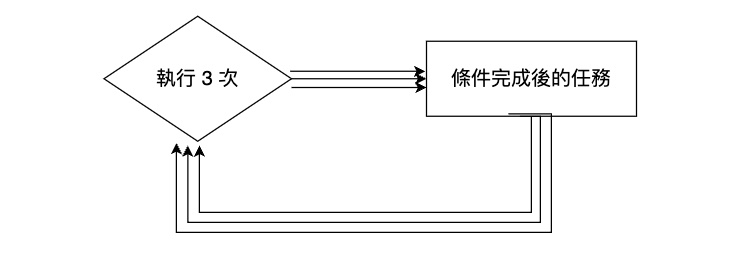
In Python we often use the range() function to specify how many times a for loop should run.
for num in range(10):
    print('Hello World')
The code above is a basic for loop example in Python. Python’s for loop syntax generally consists of the following elements:
- The
forkeyword - A variable name → num above
- The
inkeyword - A sequence or iterable object → range(10) above
The term “sequence or iterable object” looks rather intimidating, but for a beginner you can start by thinking of it as “a series of objects”. All of the following count as “a series of objects”:
- [1, 2, 3, 4, 5, 6, 7, 8]
- [“apple”, “orange”, “132”, “456”, “789”]
- [-1, -6, 65, 32]
- [2.5, 3.0, 5.2, 3.1]
So range(10) can initially be thought of as [0, 1, 2, 3, 4, 5, 6, 7, 8, 9] (note that’s 0 to 9, not 1 to 10), and for num in range(10) is equivalent to for num in [0, 1, 2, 3, 4, 5, 6, 7, 8, 9]. Taken literally, in each round of the loop num corresponds “in order” to each element of that series of numbers, so range(10) amounts to specifying that the loop runs 10 times in total.
for num in range(10):
    print(f'num: {num}')
The code above simply displays the number num corresponds to each time; running it prints num: 0 through num: 9 in order.
break and continue can be used inside a for loop just the same:
for num in range(10):

    if num == 5:
        break

    print(f'num: {num}')
In the code above, the loop is exited as soon as num is 5, so it only prints up to num: 4.
Let’s look at one more example to get comfortable writing for loops. The code below uses a for loop to compute the sum from 1 to 100. Compared with the while loop version earlier it’s considerably shorter, because “how many times to run” has already been handed off to range():
sum = 0

for num in range(101):
    sum += num

print(f'sum: {sum}')
7 Advanced Usage of range()
We’ve already seen the basic usage of range() above. In fact, the range() function can take 3 arguments, representing:
- The starting position (start)
- The stopping position (stop)
- The step length (step)
All the earlier examples supplied only one argument to range(), and what we supplied was actually stop.
range(10)In the code above we specified range()’s stop argument as 10, which is equivalent to:
[0, 1, 2, 3, 4, 5, 6, 7, 8, 9]If we supply 2 arguments to range(), they represent start and stop:
range(10, 20)The code above means start is 10 and stop is 20, equivalent to:
[10, 11, 12, 13, 14, 15, 16, 17, 18, 19]One thing to note especially: the stop position itself is not included! This is also why, when computing the sum from 1 to 100 earlier, we wrote range(101) rather than range(100).
Of course, range() can take at most 3 arguments, with the third representing the step length:
range(10, 20, 2)The sequence created by the code above is equivalent to:
[10, 12, 14, 16, 18]You can see that the numbers in the sequence differ from one another by 2.
8 Conclusion
This article walked through the concept of loops: a loop lets a program repeatedly run the same piece of code while a condition holds. Python has two forms, the while loop and the for loop — the former lets a “condition” decide whether to continue, while the latter lets a “count” decide how many rounds to run in total.
We also met the loop’s two good friends, break and continue: break leaves the loop outright, while continue skips this round and returns to the condition check. Finally we covered range()’s three arguments — start, stop and step — which give you fine-grained control over a for loop’s iteration count. In the next article, we’ll formally move on to the concept of functions.