Understanding if __name__ == "__main__" in Python


1 Introduction
In the article Understanding the Concept of Python Modules, we clearly explained the concept of Modules in Python. Before you start reading this article, it’s essential to understand what a Python Module is! As we become more familiar with Python’s basic syntax, we often import modules written by others into our programs. In doing so, we start to notice something: many people write the following in their module files:
if __name__ == "__main__":
    # code
Why not just write the code directly? Why wrap it in an if __name__ == “__main__”: statement? And what does this condition actually mean?
2 Creating a Module (tool.py) and a Main Program (main.py)
First, let’s create a Module (tool.py) in Colab and write the following code in it:
def func1():
    print("In func1")

def func2():
    print("In func2")

print("in tool.py")
Next, let’s create another file in Colab (main.py) to serve as our Main Program and paste in the following code:
import tool

tool.func1()
tool.func2()
The result should look like this:
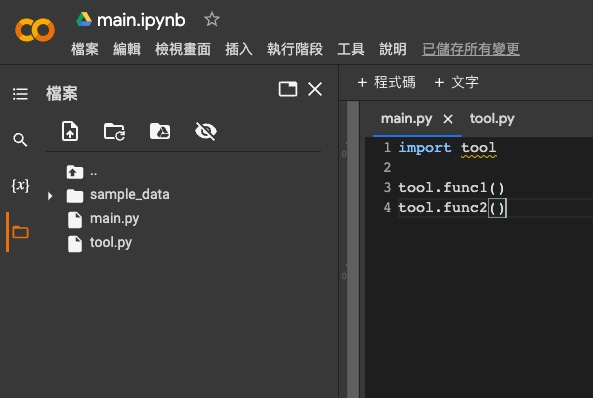
tool.py in ColabThen, we’ll execute the following command in a Colab code cell:
!python main.pyThis command tells the Python Interpreter to run the main.py program. If you’re not familiar with the Python Interpreter, don’t worry. Just know that this command tells the computer to execute the Python script. After running it, you will get the following output:
in tool.py
In func1
In func2
After learning about Python Functions, you surely understand why “In func1” and “In func2” are printed. However, you might be wondering why “in tool.py” is also part of the output. Let’s find out!
3 What Python Does When Importing a Module
When main.py is executed, the first line of code to run is import tool:
import tool

tool.func1()
tool.func2()
When the computer executes an “import module” statement in a Python program, two things actually happen:
- The computer creates special variables for that module (e.g., __name__).
- The computer executes every line of code within that module.
Taking our main.py as an example, when it runs, the computer first encounters import tool. At this moment, it sets up special variables for the tool module (like __name__) and then executes every line of code inside tool.py. As the computer executes the code in tool.py:
def func1():
    print("In func1")

def func2():
    print("In func2")

print("in tool.py")
It defines two functions and also executes the final print("in tool.py") statement. Now, here’s the problem: in main.py, we only want to use the func1() and func2() functions defined in the tool module. We don’t want to execute the print("in tool.py") at the end of the module. This is where we can use this magical conditional statement to achieve our goal:
if __name__ == "__main__":
    # code
4 Using dir() to See All Defined Names in a Module
Before we can understand what this magical conditional statement means, let’s first understand what “__name__” is. As mentioned above, when Python imports a module, two things happen:
- The computer creates special variables for that module (e.g., __name__).
- The computer executes every line of code within that module.
We can see exactly which special variables the computer sets for a module. To do this, we need to add a line of code, print(dir(tool)), to main.py. The main.py file will now look like this:
import tool

print(dir(tool))

tool.func1()
tool.func2()
Next, run the following command in Colab again to execute main.py:
!python main.pyWe will get the following output:
in tool.py
['__builtins__', '__cached__', '__doc__', '__file__', '__loader__', '__name__', '__package__', '__spec__', 'func1', 'func2']
In func1
In func2
The second line of the output lists all the defined names within the tool module. Besides “func1” and “func2,” which we defined, all the others were automatically defined for us by the computer during the import tool process.
5 Understanding the Value of __name__
We can think of the __name__ variable as the name of the module or the Python file. The value of the __name__ variable can be one of two things:
- When a module or Python file is executed directly,
__name__is set to__main__. - When a module or Python file is imported,
__name__is set to the “filename”.
For example, let’s add a new line at the very beginning of tool.py to display its __name__:
print(f"tool.py __name__: {__name__}")

def func1():
    print("In func1")

def func2():
    print("In func2")

print("in tool.py")
Now, let’s go back to the Colab editor and run the following command to execute main.py:
!python main.pyYou will get this output:
tool.py __name__: tool
in tool.py
['__builtins__', '__cached__', '__doc__', '__file__', '__loader__', '__name__', '__package__', '__spec__', 'func1', 'func2']
In func1
In func2
We can see that when the tool module is imported, its __name__ is its filename. Next, let’s return to the Colab editor and run the following command to execute tool.py directly:
!python tool.pyThis will produce the following output:
tool.py __name__: __main__
in tool.py
We can see that when the tool module is executed directly, its __name__ is __main__.
6 Using if __name__ == "__main__" to Prevent Code from Running on Import
By now, you should have a clear understanding of what __name__ is and what its value will be. Finally, if we want to prevent certain code in the tool module from being executed when it’s imported by main.py, we can place that code under the if __name__ == "__main__" condition:
print(f"tool.py __name__: {__name__}")

def func1():
    print("In func1")

def func2():
    print("In func2")

if __name__ == "__main__":
    print("in tool.py")
Let’s run main.py again in Colab with the following command:
!python main.pyYou’ll get this output:
tool.py __name__: tool
['__builtins__', '__cached__', '__doc__', '__file__', '__loader__', '__name__', '__package__', '__spec__', 'func1', 'func2']
In func1
In func2
Yay! “in tool.py” is gone.
7 Conclusion
In this article, we explained what a module’s __name__ variable is and the rules that determine its value. Finally, we demonstrated how to use the if __name__ == "__main__" statement to prevent parts of a module’s code from executing when it is imported.