Python Modules 101: A Beginner's Guide to Creating and Importing Reusable Code


1 Introduction
In “Understanding Functions in Python (Part 1),” “Understanding Functions in Python (Part 2),” and “Understanding Functions in Python (Part 3),” we provided a clear and comprehensive introduction to the concept of functions in Python across three articles.
By using functions, we can give our code a better structure. For example, after writing Python code for a specific functionality, we can package this code into a function. This way, whenever we need to use this functionality, we only need to call the function instead of rewriting the code.
In fact, the power of Python lies in the abundance of “ready-made tools” available. This means many people have already written Python code for various functions. When we want to use a particular feature, we just need to “import” the corresponding “module.”
Here, two terms we haven’t seen before have appeared: import and module. In this article, we will introduce what a module is in Python and how to create one, providing a thorough understanding of the concept. If you are already familiar with Python modules, do you know the difference between a Python Module and a Python Package?
2 What is a Module in Python?
A module in Python is simply a file containing Python code. For instance, if you write a file named example.ipynb or example.py in Colab, you can consider it a module, and the name of this module would be “example.”
You might be surprised. Is that all a module is? Does that mean every Python file we write is a module?
That’s right! We can consider any file containing Python code as a Python module. However, the code within a module usually has a specific characteristic: it’s “reusable.”
For example, we often package frequently used functionalities into several functions and place these functions in a single Python file, such as tool.py. When we need to use these functionalities in other programs, we can import this module, or just import a specific function from the module. This way, we don’t have to rewrite the same function from scratch.
3 Creating a Python Module
Now that we have a basic understanding of modules in Python, let’s create one. First, open your Colab environment and name the Colab file main.ipynb. Then, in the file list on the left, right-click and select “New file”:
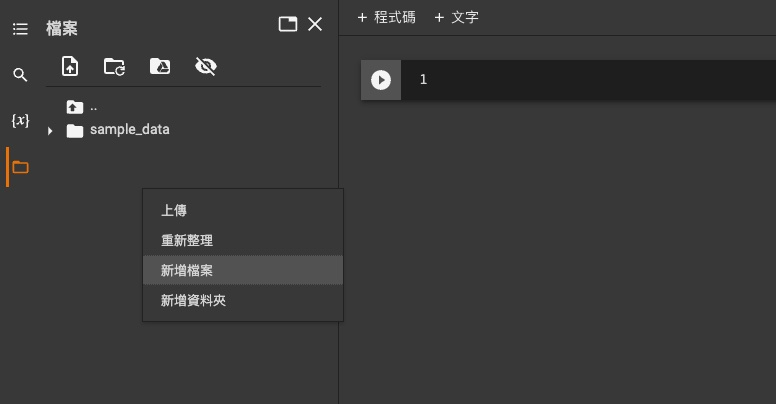
We’ll name the file tool.py, which means the name of this module is “tool.” Next, open tool.py and type the following code into it:
def sum_mul(a, b, c):
    return (a+b)*c
We’ve added a function to our module. This function calculates the sum of two numbers and then multiplies the result by a third number.
4 Importing a Module and Using its Functions
Next, we’ll start writing code in our current Colab file (main.ipynb) and use the function from the tool module. However, main.ipynb doesn’t know about the existence of the tool module, let alone how to use the functions within it. Therefore, we need to use Python’s import keyword to bring the tool module into main.ipynb:
import toolNow, main.ipynb is aware of the tool module. Although main.ipynb knows the tool module exists, it doesn’t know what functions are inside it. To use the function we just defined in the tool module, we must use the . (dot) operator:
print(tool.sum_mul(1, 2, 3))5 Four Ways to Import a Module
There are actually several ways to import a module, which can be broadly categorized into the following four methods. Let’s understand them one by one.
1. Simply Import the Module
The first method is to simply import a module and use the . operator to access the code within it.
import tool
print(tool.sum_mul(1, 2, 3))
2. Import the Module with an Alias
By using the as keyword, we can give the module a new name (an alias). This can save us some typing when accessing the module’s functions later on.
import tool as t
print(t.sum_mul(1, 2, 3))
3. Import Specific Elements from a Module
Sometimes, we don’t need to import the entire module because we only plan to use one or two elements from it. In this case, we can use the from keyword to import specific elements. This allows us to use those elements directly in our code without referencing the module name.
from tool import sum_mul
print(sum_mul(1, 2, 3))
4. Import All Elements from a Module
If a module contains many elements (like many functions), importing them one by one using the third method can be tedious. We can use the * symbol to import all elements from the module. This also allows us to use the elements directly without referencing the module.
from tool import *
print(sum_mul(1, 2, 3))
A quick note here: it is generally not recommended to import all elements from a module, as it can increase the likelihood of errors in your code.
For example, let’s say we are writing our program in main.ipynb and we define a function called sum_mul:
def sum_mul(a, b, c, d):
    return (a+b+c)*d
Then, we want to use the functionality from the tool module, so we import all of its elements:
from tool import *Now, what happens if we try to use the sum_mul function we just defined?
sum_mul(1, 2, 3, 4)---------------------------------------------------------------------------
TypeError Traceback (most recent call last)
<ipython-input-14-ceb4a433275d> in <module>()
----> 1 sum_mul(1, 2, 3, 4)
TypeError: sum_mul() takes 3 positional arguments but 4 were givenWe find that sum_mul() cannot be executed correctly because it expects 3 arguments, but we provided 4! This happens because when we imported all elements from the tool module, the sum_mul() function from the tool module “overwrote” the sum_mul() function we had originally defined.
Therefore, when importing modules, the most recommended practices are to “Simply Import the Module” or “Import the Module with an Alias.”
6 Standard Modules in Python
The Python programming language comes with many built-in, pre-made modules, which you can browse in the Python Module Index. All the modules listed in the Python Module Index are automatically downloaded when you install Python on your computer.
To use these modules, we just need to import them into our program using the various methods mentioned above. For example, Python’s standard library includes an os module:
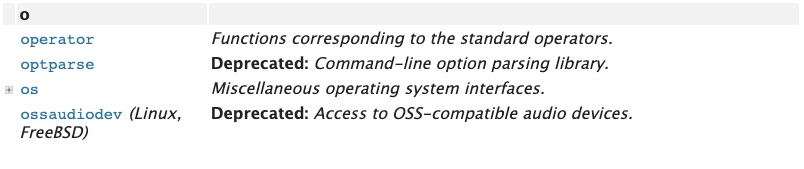
The os module defines various operations related to the operating system. For example, if we want to list all the files in a directory, we can use a function from the os module.
7 Conclusion
In this article, we’ve introduced the concept of modules in Python, learning that a Python module is essentially a Python file containing “reusable” code. We also covered four ways to import Python modules, with the most recommended methods being “Simply Import the Module” or “Import the Module with an Alias” to avoid potential errors during program execution.
In the next article, building on your understanding of Python modules, we will explore why some people write the following code in their Python files:
if __name__ == "__main__":What does this line of code do?