Organize Your Python Code: An Introduction to Packages

1 Introduction
In the article “An In-depth Look at Python Modules”, we introduced the concept of Modules in Python, understanding that a Python Module is essentially a Python file containing reusable code. Building on our understanding of Python Modules, we also explained “What if __name__ == '__main__' Does in Python”. In this article, we will introduce what a Python Package is. If a Python Module is a single Python file, then a Python Package is simply a folder that contains many Python files. Let’s dive deeper to understand what a Python Package is and how to use it.
2 What is a Python Package?
In our computer’s photo library, we don’t just dump all our pictures into one giant folder. We might organize them into different folders based on date or location. Similarly, when we are working on a large-scale Python project that includes numerous Python files (Modules), we don’t place all of them in a single directory. Instead, we organize them into different directories based on their functionality:
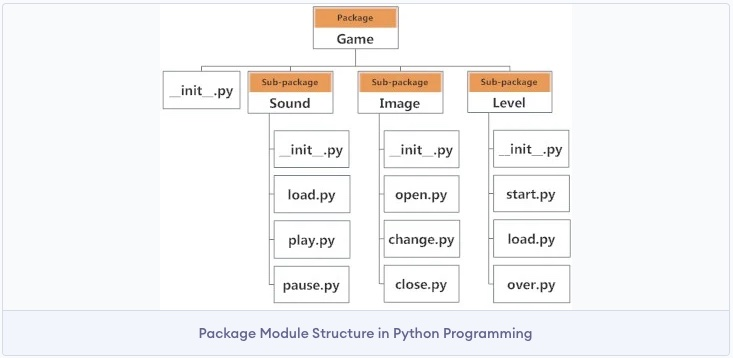
The image above shows an example. Under the Game Package, there are three sub-packages, each containing several Modules. From this example, we can also see that every Package contains a file named “__init__.py”. This file can be empty; its presence tells Python to treat this directory as a Python Package, not just a regular folder!
3 Python Package Example
Next, let’s create a Python Package to see it in action.
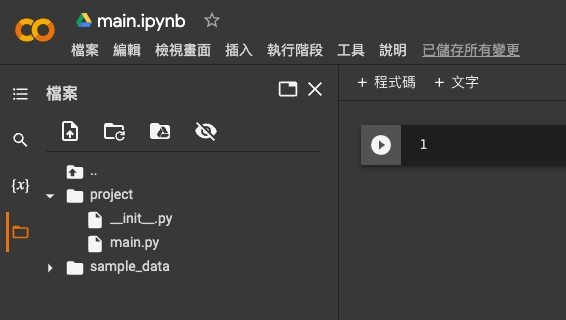
First, create a new folder in Colab named “project”. To make this folder a Python Package, we need to add an __init__.py file inside it. Let’s also add a main.py file. The file structure under “project” should look like this:
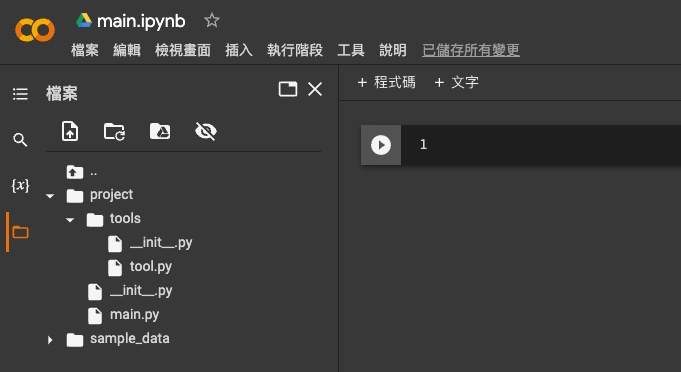
Next, let’s add another Package called “tools” inside the project directory. Similarly, to make the tools folder a Python Package, we’ll add an __init__.py file inside it. We’ll also add a tool.py file. Now, the file structure under “project” looks like this:
In tool.py, we’ll add a function that sums two numbers and then multiplies the result by a third number:
def sum_mul(a, b, c):
    return (a+b)*c
In main.py, add the following code to import the tool Module from the tools Package and use the function defined in it:
from tools import tool
print(tool.sum_mul(1, 2, 3))
Finally, run the following command in the Colab editor to execute main.py:
!python ./project/main.pyThe output shows that main.py successfully used the function defined in the tool Module from the tools Package. Of course, for different ways to import Modules from a Package or elements defined within a Module, you can refer to the four methods we introduced in the “An In-depth Look at Python Modules” article.
4 Conclusion
In this article, we introduced the concept of Python Packages. To put it simply, if a Python Module is a Python file, then a Python Package is a folder that contains many Python files.